
Test hypotheses for clear budget decisions
Define what you want to learn from your Geo Experiment so every result tells you where to invest next.
Start your Lifesight Geo Experiment with a clear hypothesis so the result tells you exactly what to do next with your budget. The Goal step helps you pick the question you want answered, from a set of common hypotheses or one you write yourself, and sets up the rest of the experiment around it.
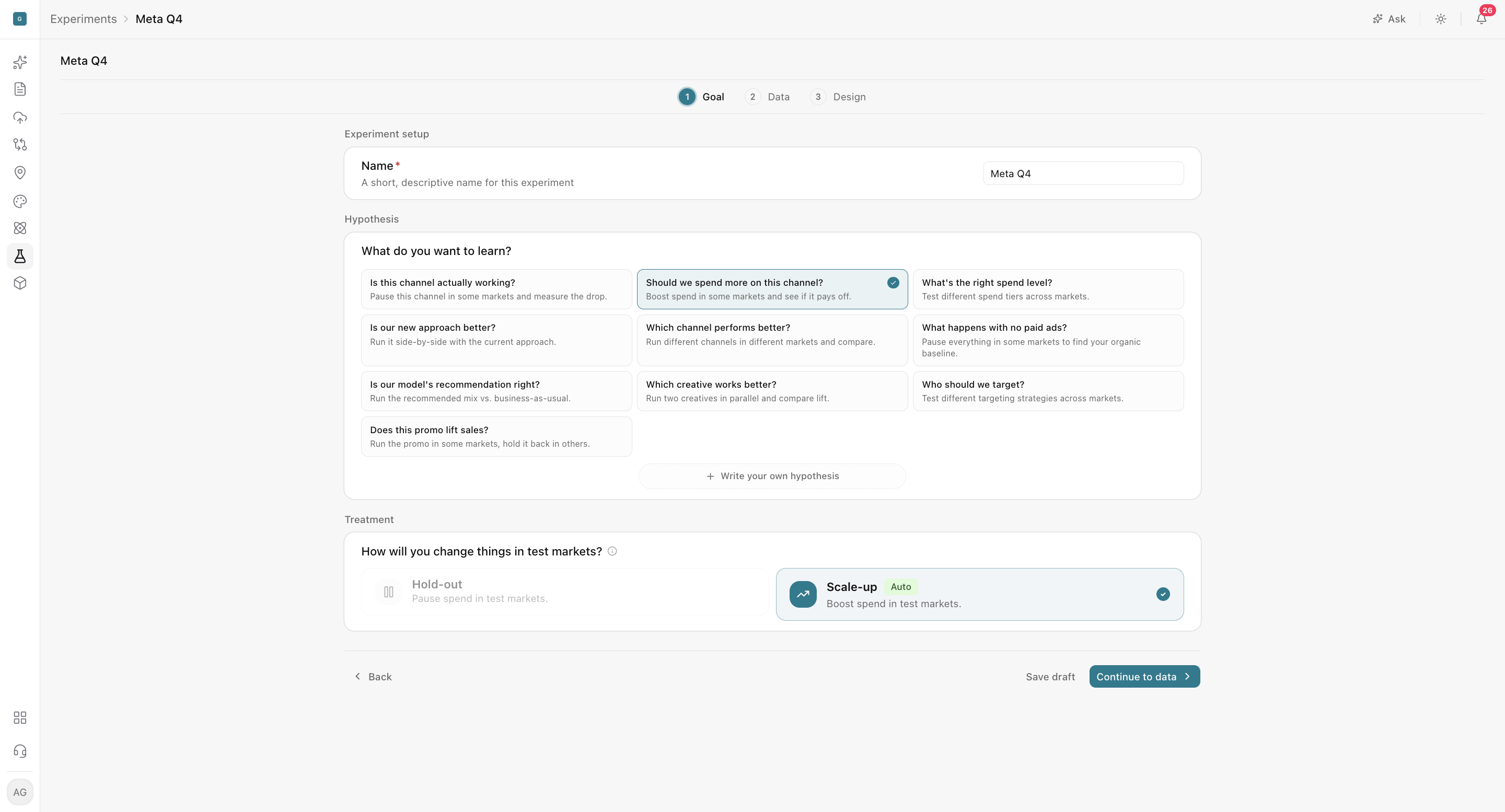
Set up your goal
The Goal step is the first of three steps in creating a Geo Experiment: Goal, Data, and Design. Here you will:
- Name your experiment: add a short, descriptive name (for example, "Meta Q4") so your team can find and recognize it later.
- Choose your hypothesis: under What do you want to learn?, select a common hypothesis or click Write your own hypothesis.
- Select your treatment: under How will you change things in test markets?, choose Hold-out or Scale-up.
- Continue: click Continue to data to move to the next step, or Save draft to come back later.
Pick the question you need answered
Each hypothesis matches a question marketers ask most often. Pick the one closest to the decision you need to make.
Is this channel actually working?
Pause a channel in some markets and measure the drop in results.
- Use it when: a channel reports strong platform ROAS, but you are unsure how much of it is incremental (results your marketing caused, beyond what would have happened anyway).
- Example: Pausing Google Search non-brand campaigns in selected markets will reduce incremental revenue compared to control markets during the test period.
- Decision it supports: keep, reduce, or reallocate the channel's budget.
Should we spend more on this channel?
Boost spend in some markets and see if the increase pays off.
- Use it when: you are considering a budget increase and want evidence before committing it across all markets.
- Example: Increasing TikTok spend by 50% in selected markets will generate incremental revenue at or above the target iROAS during the test period.
- Decision it supports: approve, limit, or reject a budget increase.
What is the right spend level?
Test different spend tiers across markets to find the most efficient level.
- Use it when: you suspect a channel is underfunded or past the point of diminishing returns (where each additional dollar delivers less than the one before).
- Example: Running YouTube at two different spend tiers across test cells will show which tier delivers the highest incremental revenue at or above the target iROAS.
- Decision it supports: set the channel's budget at the most efficient level.
Is our new approach better?
Run a new approach side by side with your current one.
- Use it when: you are rolling out a new tactic (a specific way of running a campaign, such as a new bidding strategy or campaign structure) and want proof it outperforms what you do today.
- Example: Switching Meta campaigns to Advantage+ Shopping in selected markets will produce higher incremental conversions than the current campaign setup during the test period.
- Decision it supports: roll out the new approach, refine it, or keep the current one.
Which channel performs better?
Run different channels in different markets and compare their incremental impact.
- Use it when: two channels compete for the same budget and you need to decide where the next dollar goes.
- Example: Meta prospecting will deliver a higher iROAS than YouTube in comparable markets during the test period.
- Decision it supports: shift budget toward the stronger channel.
What happens with no paid ads?
Pause all paid media in some markets to find your organic baseline (the sales you would get without paid advertising).
- Use it when: you want to measure the total contribution of paid media to your business.
- Example: Pausing all paid media in selected markets will reduce total revenue compared to control markets, showing the incremental contribution of paid advertising during the test period.
- Decision it supports: set your overall paid media budget with a clear view of what it delivers.
Is our model's recommendation right?
Run your MMM's recommended media mix against business-as-usual to validate it in market.
- Use it when: your MMM recommends a budget change large enough that you want independent proof before acting at scale.
- Example: Increasing CTV spend in selected markets, as recommended by the MMM, will deliver incremental revenue within the iROAS range the model predicts during the test period.
- Decision it supports: act on the recommendation, or recalibrate your model with the experiment result.
Which creative works better?
Run two creatives in parallel and compare their incremental lift.
- Use it when: you have competing creative concepts and platform metrics like clicks or engagement are not showing which one actually moves your KPI.
- Example: Running the new video creative in selected markets will produce higher incremental conversions than the current creative during the test period.
- Decision it supports: scale the winning creative and retire the weaker one.
Who should we target?
Test different targeting strategies across markets.
- Use it when: you are choosing between audience strategies, such as prospecting versus retargeting or broad versus interest-based targeting.
- Example: Targeting broad audiences on Meta in selected markets will produce a higher iROAS than interest-based audiences during the test period.
- Decision it supports: focus spend on the audience strategy that drives more incremental value.
Does this promo lift sales?
Run a promotion in some markets and hold it back in others.
- Use it when: you want to know whether a discount or offer creates new demand or simply gives away margin on sales you would have made anyway.
- Example: Running a 15% off promotion in selected markets will increase incremental revenue enough to offset the discount cost during the test period.
- Decision it supports: expand the promotion, adjust the offer, or drop it.
Write a strong hypothesis for a clear decision
If none of the common hypotheses fit, click Write your own hypothesis. A strong hypothesis includes five parts:
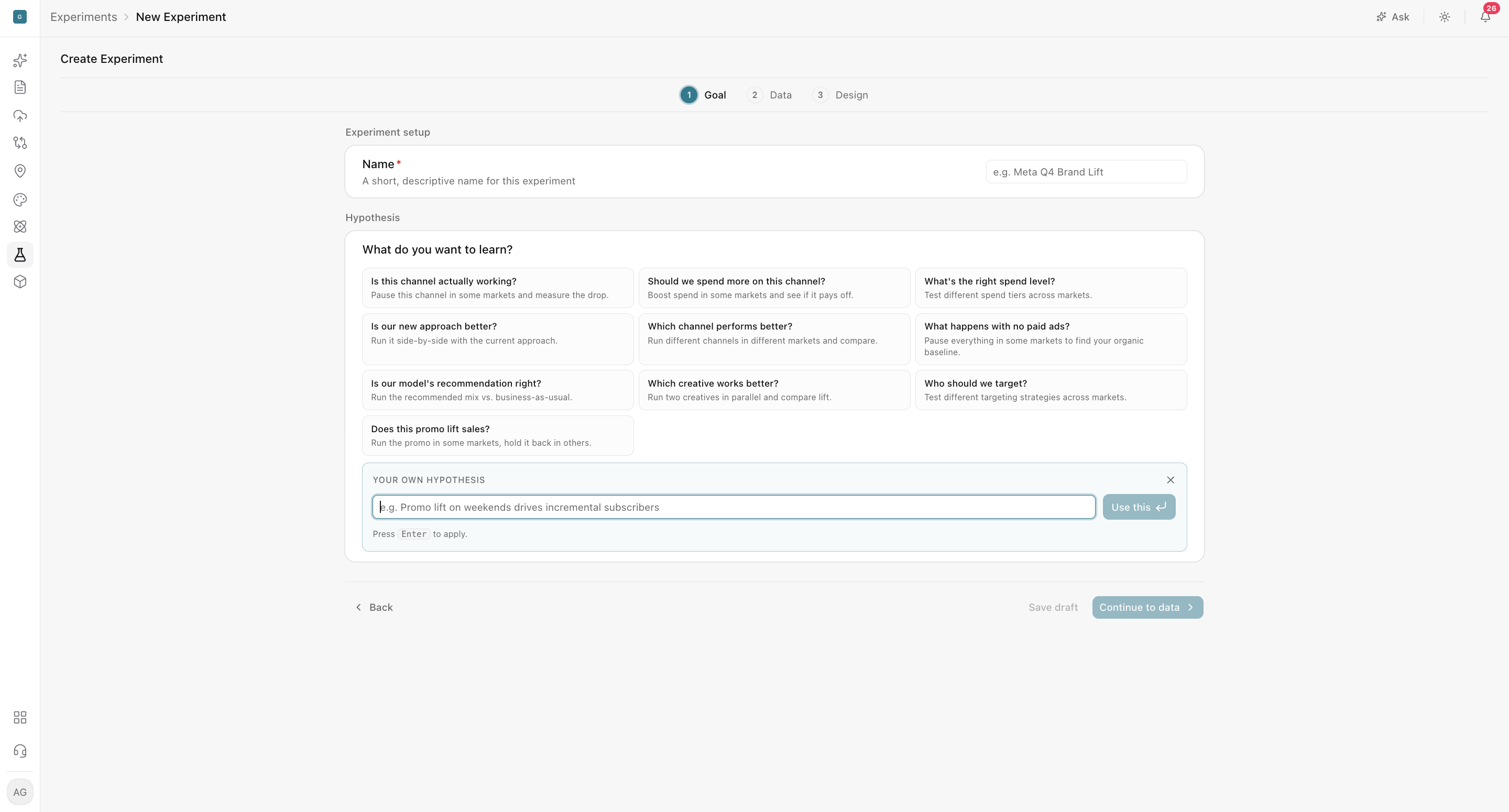
- The marketing action: what you are changing and by how much (for example, increasing Meta prospecting spend by 40%).
- The expected incremental outcome: the impact you expect to see (for example, positive incremental revenue).
- The KPI: the metric used to judge the result (for example, revenue measured against a target iROAS).
- The markets and period: where and for how long the test runs (for example, selected markets over six weeks).
- The decision: what you will do based on the result (for example, scale nationally if the target iROAS is met).
Example:
Increasing Meta prospecting spend in selected markets will produce positive incremental revenue at or above the target iROAS during the test period.
Writing down the decision before the test starts keeps everyone aligned on what the result will mean and what happens next.
Choose how to change test markets
- Hold-out: pause activity in test markets to measure what you'd lose without it.
- Scale-up: increase activity in test markets to measure what additional investment delivers.
Lifesight limits treatment choices when a hypothesis supports only one valid design. For example, "What happens with no paid ads?" can only be answered by pausing activity, so only Hold-out applies.
Make sure the design can answer it
Use the Data and Design steps to confirm that your experiment can actually answer the hypothesis. Check that the following all line up:
- The selected KPI
- Pre-treatment history (the historical data before the test begins, used to build the comparison baseline)
- Market granularity (the level of geography, such as state, DMA, or city)
- Test cells
- Duration
- Power analysis (an estimate of how likely the test is to detect a real effect of the size you expect)
Note: A hypothesis should be defined before reviewing results. Avoid rewriting it after seeing the measured outcome, since changing the question to fit the answer undermines the credibility of the result.
Frequently Asked Questions
What does the Goal step set up?
It defines your experiment's name, hypothesis, and treatment. These choices shape the rest of the experiment in the Data and Design steps.
Can I save my progress and finish later?
Yes. Click Save draft to come back to the experiment later.
How do I choose the right hypothesis?
Pick the common hypothesis closest to the decision you need to make. Each one lists when to use it and the decision it supports.
What if none of the common hypotheses fit?
Click Write your own hypothesis. Include the marketing action, expected incremental outcome, KPI, markets and period, and the decision you'll make based on the result.
What is the difference between Hold-out and Scale-up?
Hold-out pauses activity in test markets to measure what an existing activity contributes. Scale-up increases activity to measure what additional investment delivers.
Why can't I choose a different treatment for my hypothesis?
Lifesight limits treatment choices when a hypothesis supports only one valid design.
Can I use a geo experiment to check my MMM's recommendations?
Yes. Choose Is our model's recommendation right? to test the MMM's recommended media mix against business-as-usual. You can then act on the recommendation or recalibrate your model with the result.
Can I test creatives or promotions, not just channels?
Yes. Use Which creative works better? to compare creatives, and Does this promo lift sales? to measure whether a promotion creates new demand.
Can I change my hypothesis after the test finishes?
Avoid it. A hypothesis should be defined before reviewing results, and rewriting it after seeing the outcome weakens the credibility of the result.
How do I know my experiment can answer the hypothesis?
Use the Data and Design steps to confirm that your KPI, pre-treatment history, market granularity, cells, duration, and power analysis all support it.
Updated about 3 hours ago