
Attribution metrics guide
Know what every Attribution metric measures, how it's calculated, and which one to lead with for each budget decision. #
Attribution in Lifesight gives you every number you need to judge your marketing in one place, from what platforms report to what your spend actually caused and whether it's on plan. It combines four groups of metrics: incremental performance, platform-reported performance, spend and pacing, and recommendations.
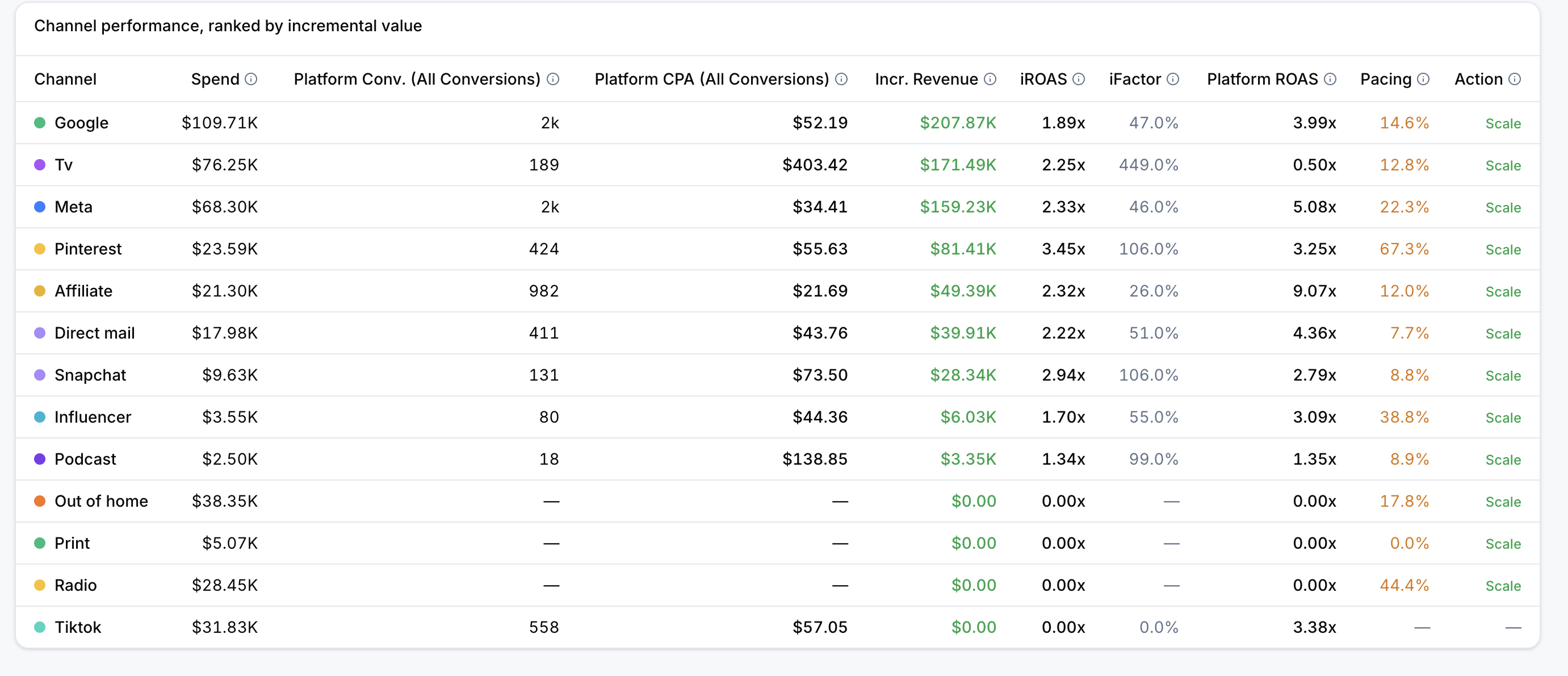
Measure what your marketing caused
Incremental metrics show the revenue and conversions your advertising actually drove, beyond what would have happened anyway. These are the metrics to lead with when deciding where to invest.
| Metric | Definition | Formula | When to lead with it |
|---|---|---|---|
| Incremental Revenue | Revenue estimated to be causally driven by advertising | Provided by Lifesight measurement | Reporting the real revenue impact of your marketing |
| iROAS | Incremental return for each unit of spend | Incremental Revenue / Actual Spend | Comparing true efficiency across channels, campaigns, or ad sets |
| Incremental Conversions | Conversions estimated to be causally driven by advertising | Platform Conversions adjusted by incrementality evidence | Measuring impact when your goal is conversions rather than revenue |
| iCPA | Cost per incremental conversion | Actual Spend / Incremental Conversions | Judging acquisition efficiency for conversion-focused campaigns |
| Incrementality Factor | Share of platform-reported revenue estimated to be incremental | Incremental Revenue / Platform Revenue | Spotting channels that claim more credit than they earn |
| Marginal ROAS | Incremental revenue expected from the next unit of spend | Derived from the promoted model | Deciding where to put new budget |
How to read them together
- iROAS versus Marginal ROAS: iROAS is the average return across all spend to date. Marginal ROAS is the return on the next dollar. A campaign with a strong iROAS but a falling Marginal ROAS has likely saturated, so extra spend won't return at the same rate.
- Incrementality Factor: a factor of 0.4 means roughly 40 cents of every reported dollar is genuinely new revenue. The rest is demand that was already coming.
Compare with what platforms report
Platform-reported metrics show performance as each advertising platform records it. They're useful for delivery and volume, but they include conversions that would have happened without the ad. Read them alongside incremental metrics to see how much reported performance holds up.
| Metric | Definition | Formula | When to lead with it |
|---|---|---|---|
| Platform Revenue | Revenue reported by the advertising platform | Platform value | Reconciling Lifesight results with platform dashboards |
| Platform ROAS | Platform-reported return on spend | Platform Revenue / Actual Spend | Showing the gap between reported and incremental return |
| Platform Conversions | Conversions reported by the advertising platform | Platform value | Checking conversion volume as the platform records it |
| Platform CPA | Platform-reported cost per conversion | Actual Spend / Platform Conversions | Comparing with iCPA to see how much reported efficiency holds up |
| Impressions | Number of ad impressions served | Platform value | Confirming delivery and reach |
| Clicks | Number of ad clicks recorded | Platform value | Checking engagement and traffic volume |
Why Platform ROAS is usually higher than iROAS
Platforms credit their ads for every conversion that follows an exposure, including ones that would have happened anyway. iROAS counts only the revenue your spend actually created, so the distance between the two shows how much credit platforms are claiming for conversions they didn't cause.
Track spend against your plan
Spend and pacing metrics compare what you've spent with what your active scenario (the media plan you've selected as your benchmark) planned. Use them to catch overspend and underspend before the period closes.
| Metric | Definition | Formula | When to lead with it |
|---|---|---|---|
| Actual Spend | Spend recorded during the selected period | Platform value | Confirming how much you've invested |
| Planned Spend | Budget allocated by the active scenario | Scenario value | Checking what the plan expected you to spend |
| Pacing | Actual spend relative to planned spend to date | Actual Spend / Planned Spend to Date | Seeing at a glance whether you're on, ahead of, or behind plan |
| Total Delta | Cumulative difference from plan | Actual Spend minus Planned Spend | Sizing how far off plan you are in total |
| Daily Average Spend | Average spend per elapsed day | Actual Spend / Days Elapsed | Understanding your current daily run rate |
| Daily Average Planned | Expected daily rate to date | Planned Spend to Date / Days Elapsed | Comparing your run rate with the planned rate |
| Daily Gap | Difference between actual and planned daily rates | Daily Average Spend minus Daily Average Planned | Pinpointing how much daily spend needs to change |
| Recommended Daily | Catch-up adjusted daily spend for the next seven days | Remaining Budget / Remaining Days | Setting a concrete daily budget in the platform |
Example
If a campaign's Planned Spend to date is $10,000 and its Actual Spend is $8,000, its Pacing is 80% and its Total Delta is -$2,000. Recommended Daily spreads the remaining budget across the remaining days, so the gap closes gradually rather than through a sudden spike in spend.
Know which way to move spend
Recommendations translate pacing into a suggested direction for each channel, campaign, or ad set.
- Scale: under-pacing against the active plan.
- Maintain: pacing within the expected range.
- Reduce: over-pacing against the active plan.
Recommendations are based on pacing, so read them alongside incremental metrics before acting. A Scale flag on a campaign with a low Incrementality Factor may mean the budget would do more elsewhere.
Find the metrics you need
Metric availability depends on the connected platforms, promoted measurement assets, and selected reporting range. Columns with no received data or only zero values may be hidden automatically and can be revealed from the table controls using Choose columns.
Frequently Asked Questions
Which metric should I use to compare channel efficiency?
Use iROAS. It shows the incremental return for each unit of spend, so you're comparing what each channel actually caused rather than what it reported.
What is the difference between iROAS and Platform ROAS?
Platform ROAS uses revenue reported by the advertising platform. iROAS uses incremental revenue, which counts only the revenue your advertising actually drove. Platform ROAS is usually higher.
What is the difference between iROAS and Marginal ROAS?
iROAS is the average incremental return across all spend to date. Marginal ROAS is the incremental revenue expected from the next unit of spend, derived from your promoted model.
How is the Incrementality Factor calculated?
Incremental Revenue divided by Platform Revenue. It shows the share of platform-reported revenue estimated to be incremental.
How are Incremental Conversions calculated?
Platform conversions are adjusted using incrementality evidence from your promoted measurement assets.
When should I use iCPA instead of iROAS?
Use iCPA when your goal is conversions rather than revenue. It shows the cost per incremental conversion.
What does a Pacing value of 80% mean?
You've spent 80% of what your active scenario planned to date, meaning you're running under plan.
How is Recommended Daily spend calculated?
Remaining Budget divided by Remaining Days. It gives you a catch-up adjusted daily spend for the next seven days.
What do Scale, Maintain, and Reduce mean?
Scale indicates under-pacing, Maintain indicates pacing within the expected range, and Reduce indicates over-pacing against the active plan.
Why can't I see some metrics?
Metric availability depends on your connected platforms, promoted measurement assets, and selected reporting range. Columns with no data or only zero values may be hidden automatically. Reveal them using Choose columns.
Why don't I see Marginal ROAS?
Marginal ROAS is derived from your promoted model. Make sure a Marketing Mix Model is promoted for your workspace.
Updated 30 days ago