
Configurations
The configurations tab allows you to map campaigns to tactics, view the recommended UTMs for Attribution, set rules and labels for cleaning and grouping data for attribution, set algorithmic weights and set your anchor attribution methodology.
Causal tab
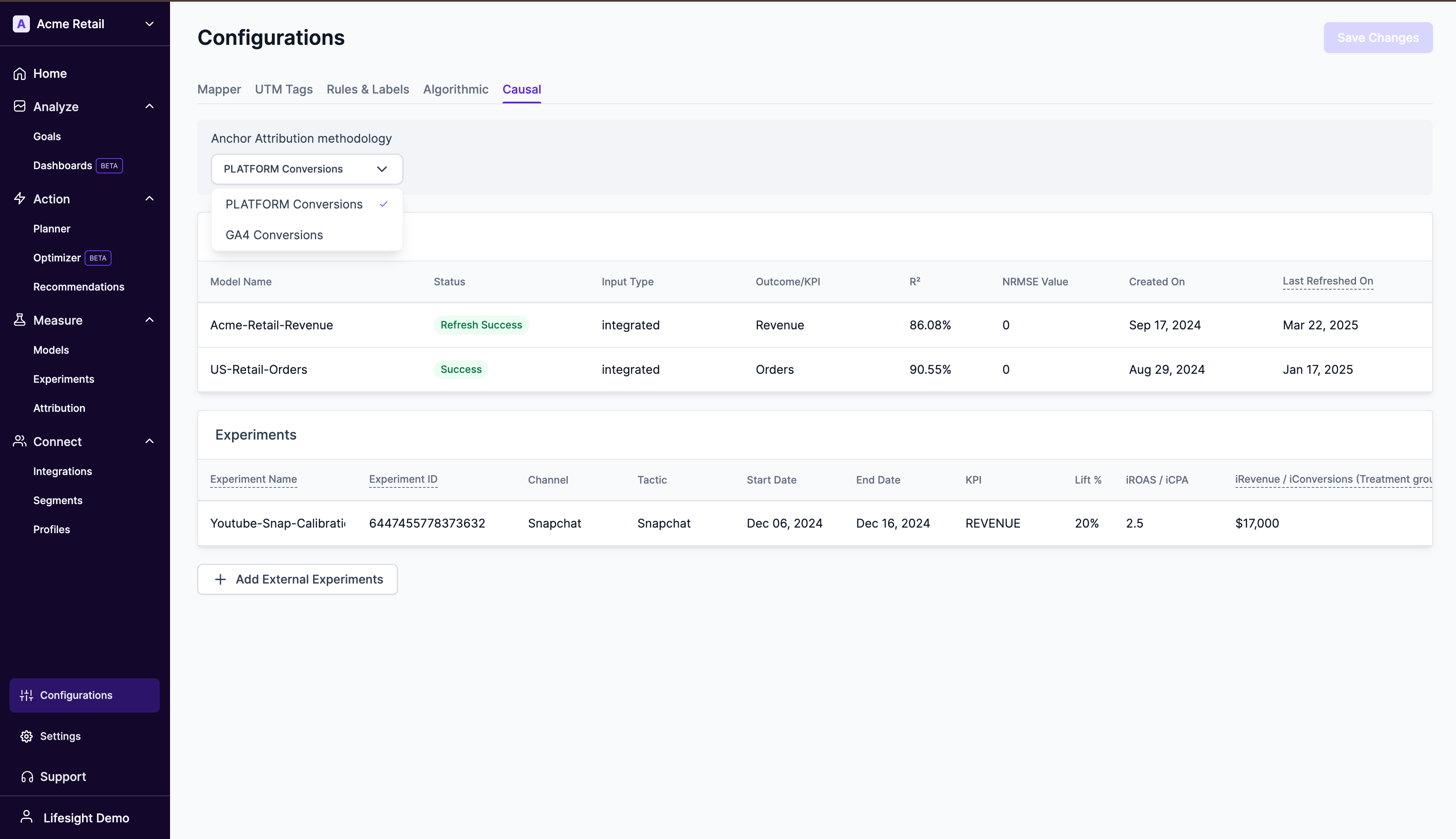
The Anchor Attribution dropdown lets you choose the reference attribution data set that all incrementality results will be calibrated against.
By selecting an anchor, you ensure that incremental results produced by your chosen measurement system(s) —Marketing Mix Modeling (MMM) or Experiments— are incorporated into the attribution numbers you care about most.
Anchor Options
| Option | Description | Typical Use-Case |
|---|---|---|
| Platform Conversions (default) | Raw conversions reported by each advertising platform (Meta Ads, Google Ads, Amazon Ads, etc.) | You rely on in-platform reporting for spend-efficiency KPIs and want incrementality expressed against these. |
| GA4 Conversions | Conversion events tracked in your connected Google Analytics 4 property. Requires a successful GA4 integration. | You trust GA4 as the source of truth for conversions and want incrementality expressed against these numbers. |
Why this matters
When you anchor incrementality numbers to a concrete attribution source you enable an apples-to-apples comparison across channels and tactics.
iFactor: Incrementality Factor refers to the additional impact or lift generated by a specific marketing channel or tactic beyond what would have occurred without it. It measures the true contribution of a channel to conversions or revenue, helping marketers understand how much value it adds. By assessing incrementality, marketers can identify which campaigns or channels are driving actual growth, allowing for more informed decisions on budget allocation and optimization. This ensures that marketing efforts focus on tactics that generate real, incremental value rather than just attributing success to activities that would have happened anyway.
- If Platform Conversions are used as an anchor, then iFactor = iRevenue / pRevenue, where iRevenue is the incremental revenue generated from MMM or Experiments and pRevenue is the platform-reported revenue. Broadly stated, (iFactor = iConversions / pConversions)
- If GA4 Conversions are used as an anchor, then iFactor = iRevenue / ga4Revenue, where iRevenue is the incremental revenue generated from MMM or Experiments and ga4Revenue is the GA4-attributed revenue. Broadly stated, (iFactor = iConversions / ga4Conversions)
How to set custom attribution weights?
- Navigate to Settings > Triangulation tab
- Select your preferred anchor attribution method (Coming soon)
- Enter custom weights in the for each channel in the table to apply them on your anchor attribution methodology.
Updated over 1 year ago