For AI agents: visit https://docs.lifesight.io/llms.txt for an index of all pages formatted in Markdown and endpoints in OpenAPI.
Jump to Content
LifesightDocumentation
Documentation
DocumentationLifesight
Documentation
Documentation

INTRODUCTION

  • What is Lifesight ?
  • How Lifesight Works

GETTING STARTED

  • Getting onboarded
    • Onboarding - Brands
    • Onboarding - Agency

METHODOLOGIES

  • Marketing Mix Modeling
    • Lifesight's Modeling Framework
    • Causal Reasoning in Modeling
      • Causal Discovery
      • Backpropogation & Effect Adjustments
    • ML Based Inference
      • Ridge Regression
      • Transformation - Adstock
      • Transformation - Saturation
      • Evolutionary Fine Tuning
      • Model Selection
      • Model Accuracy
      • Model Calibration
    • Ensemble Forecasting
  • Incrementality Testing
    • Lifesight's Testing Framework
      • Designing Geo-Experiments: Identifying Geos
      • Geo Experiments : Power Analysis
      • Geo Experiments - Insights & Validation
      • Automated deployment of experiments
      • Geo Experiments: Comparison between methodologies
    • Split Testing
      • Split Testing : Statistical Significance
      • Split Testing : Treatment / Control Assignment
      • Split Testing : Understanding normalized Control
  • Attribution
    • Causal Attribution
    • Multi Touch Attribution
      • Single-Touch Attribution
      • Multi-Touch Attribution
      • View Through Attribution
      • Algorithmic Attribution

COMPARISONS & USE CASES

  • Lifesight Advantage
  • Lifesight vs Other MMM Vendors
  • Lifesight vs Other Testing Vendors
  • Lifesight vs Other Attribution Vendors
  • Lifesight vs Competitors
  • Use Cases

PLATFORM

  • About the platform
  • Connect
    • Integrations
      • Custom Connector
      • Lifesight Custom Backend Implementation
      • JavaScript SDK
      • Lifesight Tracking Pixel
      • Shopify
      • Google Ads
      • Google Analytics
      • Meta Ads
      • X Ads
      • LinkedIn
      • Adroll
      • Pinterest
      • TikTok
      • Klaviyo
      • Snapchat
      • Microsoft Ads
      • Amazon Ads
      • Google Display & Video 360
      • Attentive
      • Google sheets
      • BigQuery
      • Snowflake
      • Moloco Ads
      • Taboola
      • Salesforce Commerce Cloud
      • Vibe CTV
      • Reddit Ads
      • Walmart Connect
      • Amazon S3
      • Criteo
      • Outbrain
      • Awin
      • CJ Affiliate
      • Impact
      • Everflow
      • Adtraction
      • Roku
    • Segments
      • What are segments?
      • Segment sync
    • Profiles
      • What are profiles
      • Identity graph
  • Measure
    • Marketing Mix Modeling
      • Setting up your Mix Model
      • CSV Data Formatting Guidelines
      • Model Overview
      • Model Attributes
      • Causal Flags
      • Insights
      • Channel Deep Dive
      • Campaigns
      • Profit & Cost Settings
      • Model Refresh
      • Model Retraining
      • Model Calibration
      • Merging Models
    • Experiments
      • Geo Experiment
      • Geo Experiment Design
      • Geo Experiment Insights
      • Geo test data schema
    • Attribution
      • Getting started with attribution
      • Overview
      • Purchases
      • Conversions
      • Journeys
      • Attribution chart
      • Attribution metrics guide
  • Action
    • Planner
      • Building a media plan
      • Intrepreting a plan
      • Default Scenario
      • Custom Budget Pacing
    • Recommendations
    • Optimizer
      • Automated Budget Optimization
      • Manual Changes
      • Logger
  • Analyze
    • Dashboards
      • Dashboard Overview
      • Dashboard Modes Overview
      • Dashboard Settings Overview
      • Intro to Element Types
      • Create a Dashboard
      • Create & Manage Dashboard Layouts
      • Edit, Draft, and Publish a Dashboard
      • Dashboard versions and version history
      • Add version tags to Dashboards and data models
      • Copy and paste Dashboard pages
      • Copy and paste Dashboard elements
      • Manage Dashboard page visibility
      • Manage Dashboard refresh options
      • Change the data source for a Dashboard or element
      • Visualizations
  • Settings
    • Company
    • User roles
      • Add/Remove users
      • User permissions
    • UTM Tags
    • Rules & Labels
      • How to setup custom rules
    • Domain Settings
    • Configurations
    • Workspaces
    • Account
      • View account details and change password
      • Reset your password
    • Profile
    • Whitelabeling Conditions
  • Configurations
  • MCP
    • Setup Guide Claude
    • Setup Guide ChatGPT
    • MCP Prompt Library

HOW TO'S

  • Centralizing & operationalizing your data
    • How to sync segments to destinations
    • How to setup custom attribution weights
    • How to setup UTM, rules & labeling
  • Planning, forecasting & optimization
    • How to optimize budget using constraints
    • How to select planning base period
    • How to plan for seasonality & promotions
    • How to compare scenarios in plans
    • How to manage budget changes
    • How to optimize your budget
    • How to plan your optimal budget
  • Measuring marketing effectiveness
    • How to test for new channel launch
    • How to optimize a media mix for your goal
    • How to validate effectiveness and ROIs
    • How to validate your MMM accuracy
    • How to improve your MMM model
  • Analyzing marketing performance
    • How to track your goal progress

LEARN

  • Glossary
  • Academy

SUPPORT

  • Marketing science services
  • FAQs

SECURITY & COMPLIANCE

  • Data governance
    • Consent
  • Data localization
  • Data security compliance
    • GDPR
    • SOC 2
    • HIPAA
    • ISO 27001

PARTNERS

  • Lifesight Partner Program
  • Onboarding new clients/brands
  • Modify client workspace
Powered by 

Profile

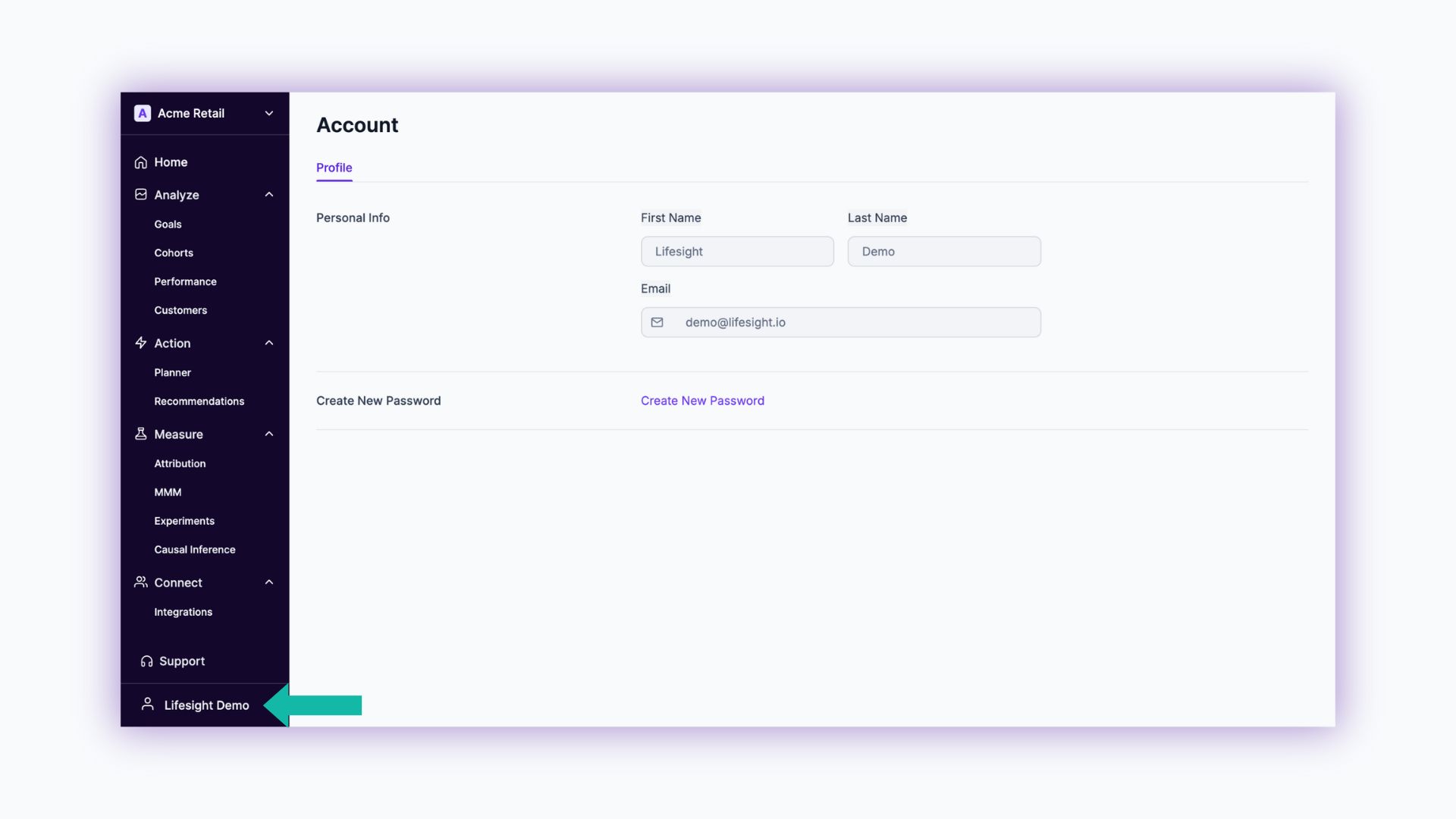
  1. Click on the Profile Name in the bottom left of the Lifesight dashboard.

To reset your password

Incase you forget your password, you can reset it quickly using the Reset your password steps

Updated over 1 year ago


Reset your password
Whitelabeling Conditions
    • To reset your password