
Set your default scenario
Promote your strongest scenario so your team plans, paces, and deploys from the same approved plan.
Your default scenario is the plan your team works from. In Lifesight, the scenario you promote ⚡ to Decisions becomes the default scenario for your workspace.
Its plan loads on the Planner home view and supplies recommendations to supported downstream workflows, so everyone planning, pacing, and deploying spend is aligned on the same approved numbers.
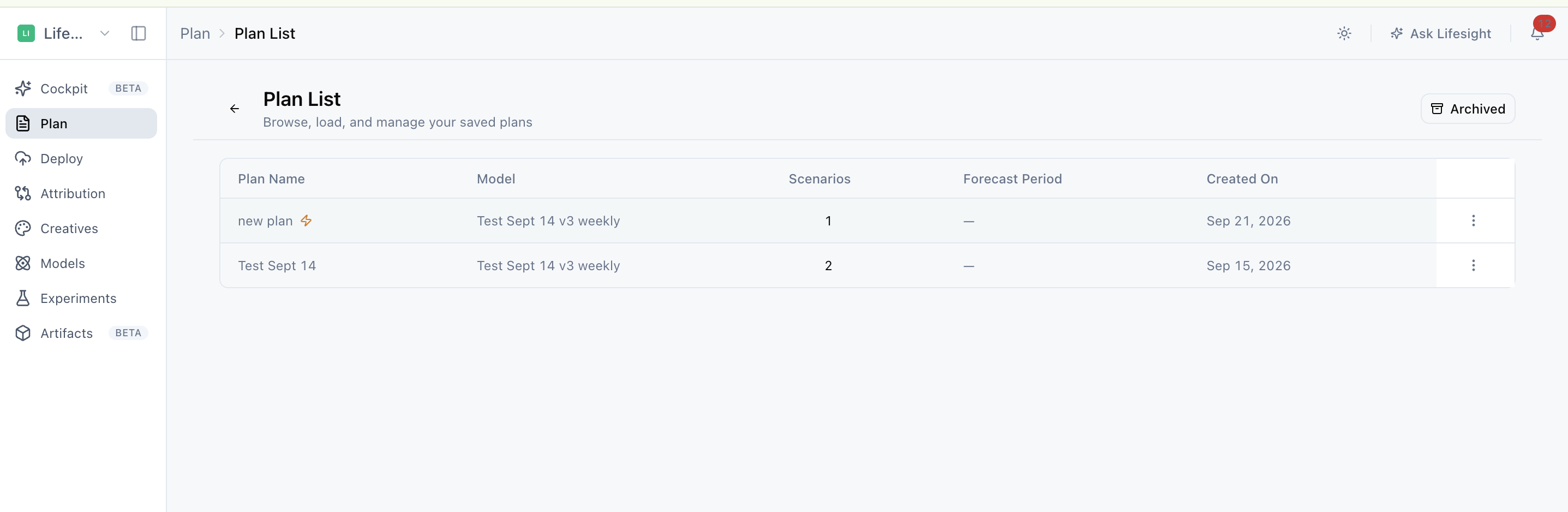
Promote a scenario to make it your default
Once you have compared your scenarios and found the one you want to move forward with, promote it:
-
Open a saved plan from Plan List.
-
Select the scenario you want to use.
-
Review its configuration and completed results, including the model, dates, budget, constraints, forecast, and channel recommendations.
-
Select Promote to Decision.
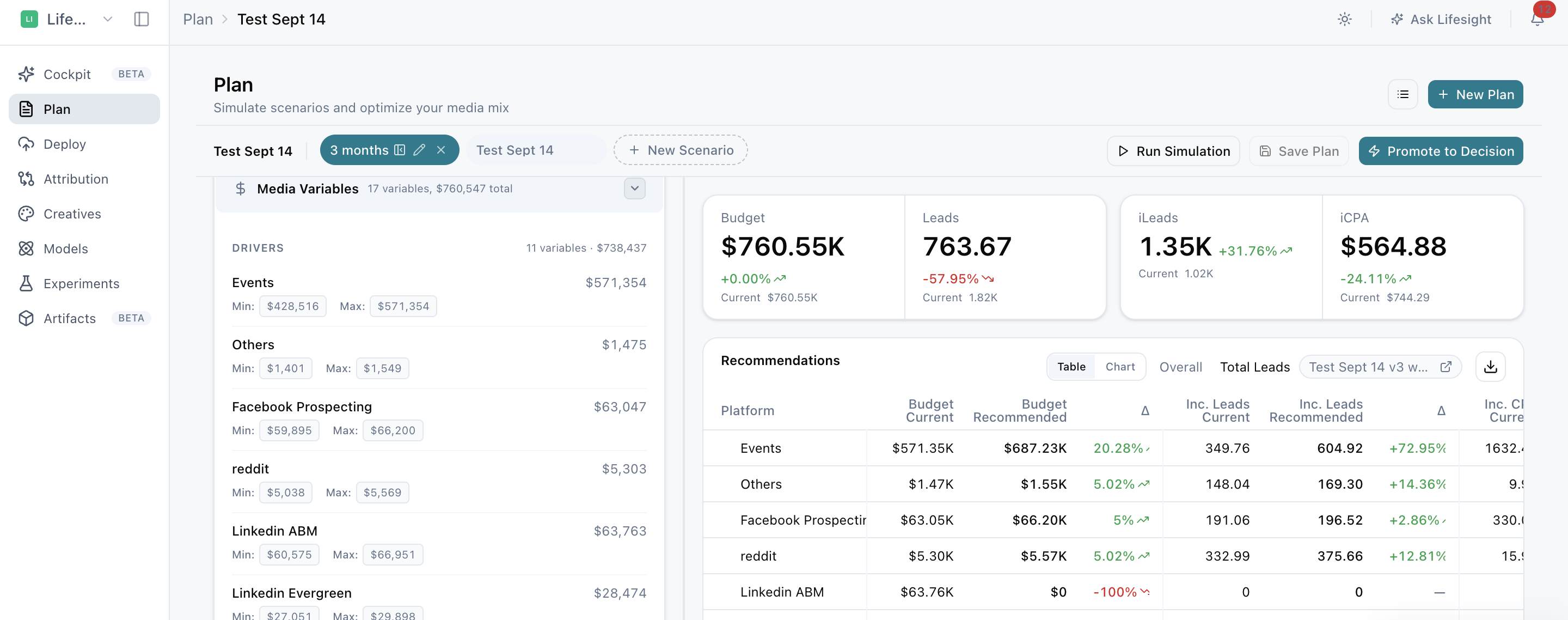
-
Confirm the promotion.
The promoted scenario is marked in both the plan and Plan List ⚡, so it is easy to see which scenario your team is working from. Each workspace has one promoted scenario at a time. Promoting a different scenario replaces the current one as the workspace default.
See your approved plan the moment you open Planner
When you open Planner without selecting another plan, your promoted plan appears as the default view. This home view is read-only (you can view results but not change them), which keeps your approved plan protected from accidental edits.
To edit the plan, rerun scenarios, or add a new scenario, open the plan from Plan List. This gives you an editable view.
Change or remove your default scenario
Your default can change as your plans evolve:
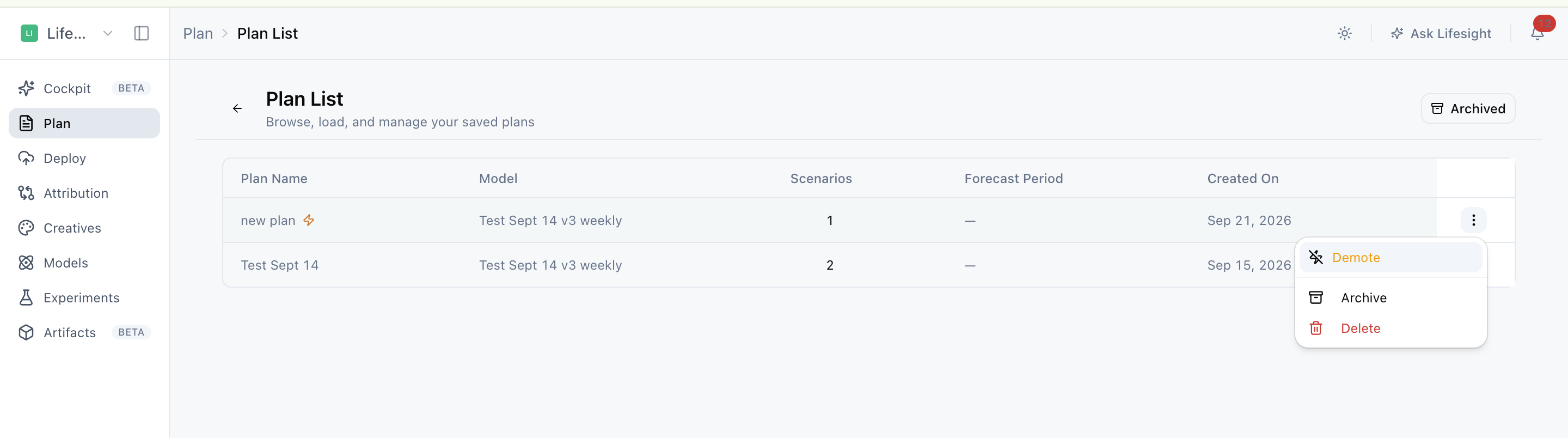
- To change the default, promote a different completed scenario (a scenario whose simulation has finished running). It replaces the current default right away.
- To remove the default, select Demote in Plan List. This removes the current promotion without deleting the plan, so you can still open, edit, or promote it again later.
Put your default scenario to work downstream
Your promoted scenario does more than set the Planner home view. It can:
- Power Attribution pacing and recommendations, so in-flight spend is tracked against your approved plan (pacing shows whether spend is on track against what you planned over time).
- Be opened in Deploy for implementation, so your team can move straight from an approved plan to execution.
Because your promoted scenario feeds downstream workflows, promote only after reviewing the model choice, dates, budget, constraints, forecast, and channel recommendations.
Frequently asked questions about the default scenario
What is a default scenario in Lifesight?
The default scenario is the scenario promoted to Decisions in your workspace. Its plan loads on the Planner home view and supplies recommendations to supported downstream workflows, including Attribution and Deploy.
How do I set a default scenario in Planner?
Open a saved plan from Plan List, select the scenario you want to use, and review its configuration and results. Then select Promote to Decision and confirm. The promoted scenario becomes the default for your workspace.
Can a workspace have more than one promoted scenario?
No. Each workspace has one promoted scenario at a time. Promoting a different scenario replaces the current default.
How can I tell which scenario is promoted?
The promoted scenario is marked in its plan and in Plan List.
Why can't I edit the plan on the Planner home view?
The Planner home view shows your promoted plan in read-only mode to protect it from accidental changes. To edit the plan, rerun scenarios, or add a new scenario, open the plan from Plan List.
How do I change my default scenario?
Promote a different completed scenario. It replaces the current default for the workspace.
How do I remove the default scenario without deleting the plan?
Select Demote in Plan List. This removes the current promotion while keeping the plan available to open, edit, or promote again later.
Can I promote a scenario that hasn't finished running?
Only completed scenarios, meaning scenarios whose simulation has finished, can be promoted to replace the default.
What happens after I promote a scenario?
The promoted scenario can power Attribution pacing and recommendations, and it can be opened in Deploy for implementation, so your approved plan flows directly into tracking and execution.
What should I check before promoting a scenario?
Review the model choice, dates, budget, constraints, forecast, and channel recommendations. Because the promoted scenario feeds downstream workflows, confirming these first helps make sure your team acts on the right plan.
Related Articles
Updated 30 days ago