
Interaction: See which channels lift each other and which cancel each other out
Explore modeled interactions between marketing variables.
Interaction shows you how your media variables (the channels, campaigns, or tactics your model measures) work together, so you can spot where two channels amplify each other (synergy), where they eat into each other's performance (cannibalization), and where they simply run independently of one another.
Use it to decide which combinations are worth funding together and which pairings are quietly costing you.
Interaction helps you identify synergy, cannibalization, and neutral combinations across your media mix. It is hidden by default and can be enabled from Customize Tabs.
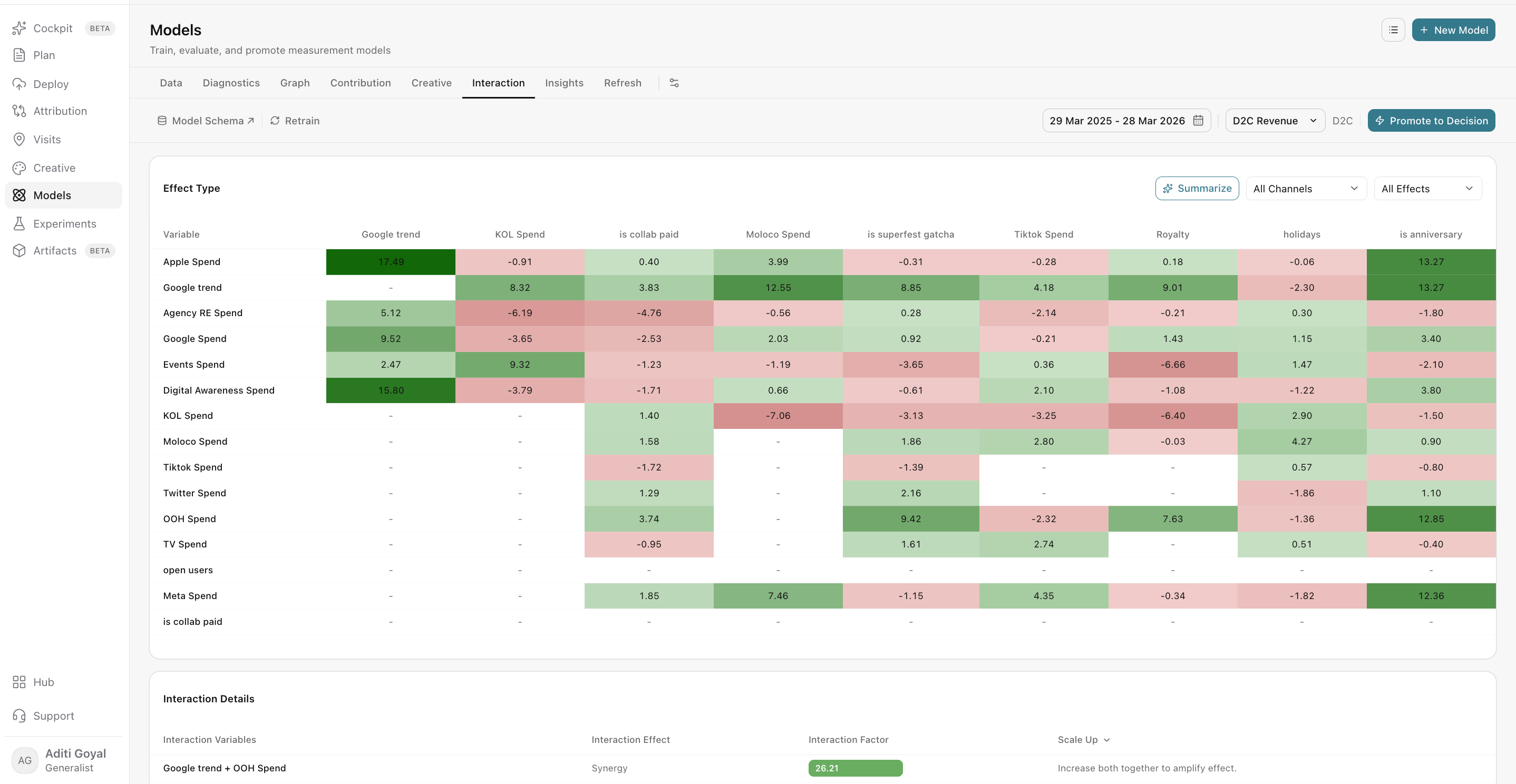
Focus on the pairs that matter
Filters help you cut through a large set of channel pairs and zero in on the ones relevant to your decision. Any filter you apply updates both the matrix and the interaction-pairs table, so the two views always stay in sync.
Available filters
- Channel filter: narrow the analysis to the channels you care about. For example, if you're planning a CTV push, filter to CTV to see every channel it interacts with.
- Effect filter: show only synergy, cannibalization, or neutral pairs. For example, filter to cannibalization to find the pairings that may be wasting budget.
- Action filter: review all pairs, only Scale Up suggestions, or only Scale Down suggestions. Use this when you want to jump straight to pairs with a recommended next step.
Spot patterns at a glance
The matrix (a grid that plots every variable against every other variable) gives you a visual overview of interaction strength and direction across all your pairs. Stronger colors point to stronger interactions, and the color tells you whether the effect is positive or negative.
How to use the matrix
- Scan it to locate patterns, such as one channel that interacts with many others, or a cluster of channels that consistently work well together.
- Once you've found a pattern worth exploring, move to the interaction-pairs table for the detailed result.
- Matrix cells are for orientation only. Selecting a cell does not open pair details.
Understand each pairing
The interaction-pairs table gives you the detailed result for every pair, so you can see exactly how two channels affect each other and what to do about it.
How pairs are classified
- Synergy: the variables are associated with a stronger joint effect. Running them together appears to deliver more than each would on its own.
- Cannibalization: the joint effect is weaker, and the variables may compete or overlap. For example, two channels may be reaching the same audience and claiming the same conversions.
- Neutral: the model does not show a material positive or negative interaction. These channels appear to perform independently of one another.
What to review for each pair
Look at strength, direction, and the suggested action together, rather than acting on any one of them alone.
- Strength: how large the interaction effect is.
- Direction: whether the effect is positive (synergy) or negative (cannibalization).
- Suggested action: whether the pair points toward Scale Up or Scale Down.
A large result that doesn't make business sense should be investigated before you act on it. For example, a strong synergy between two channels that target completely different audiences in different markets is worth a closer look before it shapes your budget.
Act on what you find
Interaction results are most useful as a starting point for better planning decisions.
Ways to use interaction findings
- Coordinate complementary channels: plan and fund synergistic pairs together so they reinforce each other.
- Investigate audience or timing overlap: for cannibalizing pairs, check whether the channels target the same people or run at the same time, and adjust to reduce overlap.
- Form hypotheses about sequencing or joint activation: for example, test whether running awareness channels ahead of performance channels improves results.
Validate before making major changes
Validate material decisions with campaign context and experiments where possible. Interaction output describes the selected model and data period. It does not prove that changing one channel will cause the other channel's performance to change.
Before shifting significant budget based on an interaction finding, confirm it with a test, such as a geo experiment, that measures the real-world effect.
Frequently Asked Questions
Why can't I see Interaction?
Interaction is hidden by default. Enable it from Customize Tabs.
What is the difference between synergy and cannibalization?
Synergy means two variables are associated with a stronger joint effect when they run together. Cannibalization means the joint effect is weaker, often because the variables compete for the same audience or overlap in the conversions they drive.
What does a neutral pair mean?
The model does not show a material positive or negative interaction between those variables. They appear to perform independently, so changing one is unlikely to affect the other's performance based on this model.
Why doesn't clicking a matrix cell open the pair details?
The matrix is designed as a visual overview for spotting patterns. For the detailed result on any pair, use the interaction-pairs table.
Do the filters affect both the matrix and the table?
Yes. The channel and effect filters apply to both the matrix and the interaction-pairs table.
What do Scale Up and Scale Down mean?
They are suggested actions for a pair. Use the action filter to review all pairs or only those with a Scale Up or Scale Down suggestion. Review each suggestion alongside the pair's strength and direction before acting on it.
Can I shift budget based on an interaction result alone?
Interaction results describe the selected model and data period, and they do not prove cause and effect. For material budget decisions, validate the finding with campaign context and, where possible, an experiment.
What should I do if a result looks unusually strong or doesn't make sense?
Investigate it before using it. Check campaign context, audience targeting, and timing. A large result with limited business plausibility may reflect something other than a true interaction.
Will interaction results change over time?
Results reflect the selected model and data period. If you switch models or the data period changes, the interaction results may change too.
Related Articles
Updated about 2 hours ago