
Model Retraining: Keep the model fresh as your data changes
Spin up a new model version with updated configuration and calibration, without starting over.
Retraining lets you build a new model on top of one you already trust, so you can bring in fresh calibration evidence, adjust configuration, or revisit assumptions without setting everything up from scratch. Your source model stays untouched, and the new model runs alongside it so you can compare the two and promote the stronger one with confidence.
Know when to retrain
A retrain is the right move when the inputs that shape your model need to change, not just the data flowing through it.
Retrain when you need to:
- Add or update calibration evidence (results from incrementality tests, such as geo experiments or lift studies, that anchor the model to real-world outcomes). For example, you've just completed a new geo holdout test and want the model to reflect what it found.
- Change model configuration. For example, you want to adjust settings that control how the model learns from your data.
- Revisit assumptions. For example, your team has new information about how a channel behaves, and the current assumptions no longer reflect it.
- Respond to a change in your business structure. A refresh (updating an existing model with the latest data while keeping its setup the same) works well when your business looks the way it did when the model was built. When that is no longer true, such as after a significant shift in your channel mix, markets, or go-to-market approach, retraining is the better choice.
Retrain or refresh? If you only need the model to catch up on recent data, a refresh is usually enough. If you need to change what the model is told, how it is set up, or what evidence it is calibrated against, retrain.
Create a retrained model
Steps to start a retrain
- Open Model List.
- Open the action menu for an eligible model.
- Select Retrain.
- Enter a unique name for the new model.
- Review the inherited setup and update the editable steps.
- Submit the model for training.
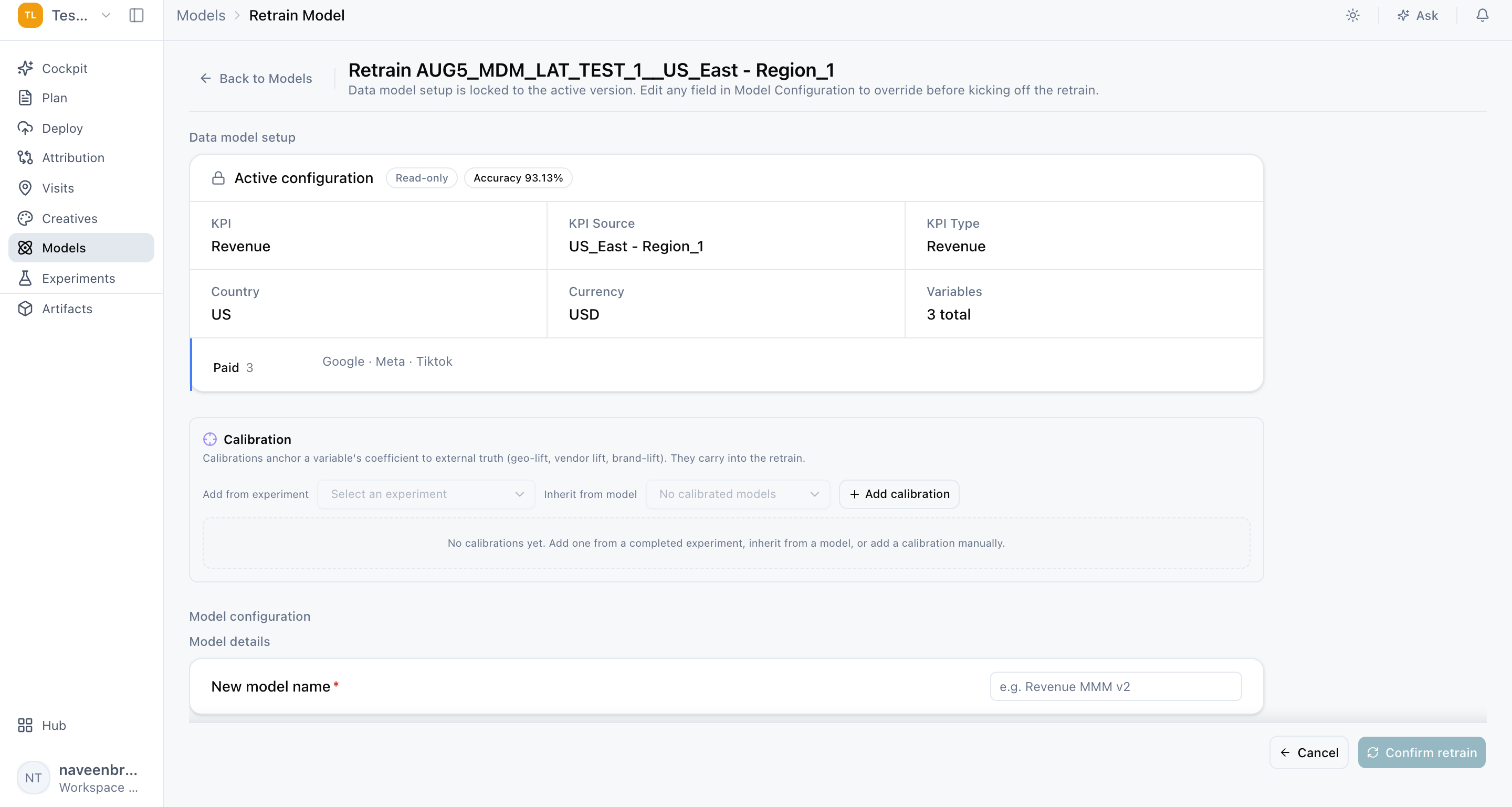
What carries over and what you can change
The new model inherits its setup from the source model, so you only need to update what has changed.
- Inherited and read-only: data source and variable selection. These stay the same so that the new model can be compared directly with the source model.
- Editable: model configuration and calibration evidence. This is where you make the changes that prompted the retrain.
Before you submit, review the complete setup end to end. A careful review makes sure the new result reflects only the changes you intended, which keeps the comparison with your source model clean and meaningful.
Validate before you promote
Treat your retrained model as a challenger (a candidate model that competes with your current promoted model before it can replace it). It should earn its place through review, not replace your current model automatically.
What to review
Work through Data, Diagnostics, Graph, and Contribution before you promote the new model. Then compare it against your current promoted model on:
- Backtest performance: how accurately the model predicts outcomes for periods it was not trained on.
- Contribution shifts: how much credit each channel receives, and whether any changes are explained by the updates you made.
- Uncertainty: how confident the model is in its estimates, and whether that confidence has improved or narrowed.
- Channel behavior: whether each channel's response looks sensible and consistent with what you know about your marketing.
If the challenger performs better and its changes make sense, promote it. If not, your current promoted model remains in place, and nothing about it has changed.
Name models so comparisons stay easy
Use a name that identifies the reason or period for retraining, for example "Q3 2026 geo test calibration" or "Post-CTV expansion retrain." Clear names make it easy to compare models side by side and to manage your model lifecycle as your list grows.
Frequently Asked Questions
Does retraining change or replace my current model?
No. Retraining creates a separate new model. Your source model stays exactly as it is, and it remains your promoted model until you choose to promote the retrained one.
What is the difference between a refresh and a retrain?
A refresh updates an existing model with the latest data while keeping its setup the same. A retrain creates a new model where you can change calibration evidence, configuration, or assumptions. Refresh to keep a model current; retrain when what the model needs to know has changed.
Why can't I change the data source or variables when retraining?
The data source and variable selection are inherited so the retrained model can be compared fairly with its source model. Keeping these fixed means any difference in results comes from the changes you actually made.
What can I update during a retrain?
You can update model configuration and calibration evidence.
Why do I need a unique name for the retrained model?
Each retrain creates a new model in your Model List, so a unique name keeps models distinguishable. Naming it after the reason or period for retraining makes future comparisons much easier.
Why isn't Retrain available for one of my models?
Retrain is available only for eligible models. If you don't see the option in a model's action menu, that model can't be used as a source for retraining.
How do I decide whether to promote the retrained model?
Review Data, Diagnostics, Graph, and Contribution, then compare backtest performance, contribution shifts, uncertainty, and channel behavior against your current promoted model. Promote the retrained model when it performs better and its changes are explained by the updates you made.
What should I do if contributions shift a lot after retraining?
Check whether the shift lines up with the changes you made, such as new calibration evidence for that channel. Shifts that are explained by new evidence are expected. Shifts you can't explain are a signal to review the setup before promoting.
Can I retrain a model more than once?
Each retrain creates a new model from a source model, so you can retrain again whenever new evidence or changes call for it. Clear naming helps you keep track of each version.
Related Articles
Updated about 2 hours ago