
Data Taxonomy: Turn campaign names into a structure you can measure on
Group your campaigns into tactics (sets of campaigns that work the same way, like prospecting or retargeting) so your results roll up by what the spend was meant to do.
Data Taxonomy lets you measure your marketing the way you actually run it, by grouping campaigns into tactics instead of relying on how ad platforms organize them. Ad platforms organize spend by account, campaign, ad set, and ad. That structure is useful for running campaigns but close to useless for measuring them, because two campaigns in the same account can be doing completely different jobs.
Take a Google Ads account with one campaign defending your brand terms and another prospecting on generic keywords.
The brand campaign will show an excellent return, because people searching for your name were mostly going to buy anyway. The prospecting campaign will look worse, yet it may be the one genuinely growing your business. Average them into a single Google Ads number, and you've hidden the only insight that mattered.
Data Taxonomy fixes this. You group campaigns into tactics, which are the units you actually want to measure.
Define tactics around the decisions you make
Platforms group your spend by where it ran. A tactic groups it by what it was meant to do. You define tactics in your own words, usually combining a channel with an intent, and often a funnel position (where the campaign sits in the customer journey, from awareness at the top to purchase at the bottom):
- Paid Search Brand Upper
- Paid Search Non-Brand Lower
- Paid Social Prospecting Upper
- Paid Social Retargeting Lower
- Online Video Awareness Upper
- Shopping Performance Lower
There's no single correct list. The right set is the one that matches the budget decisions you make. A good rule of thumb: create a tactic when you would realistically change its budget independently of everything else.
Know where to classify your campaigns
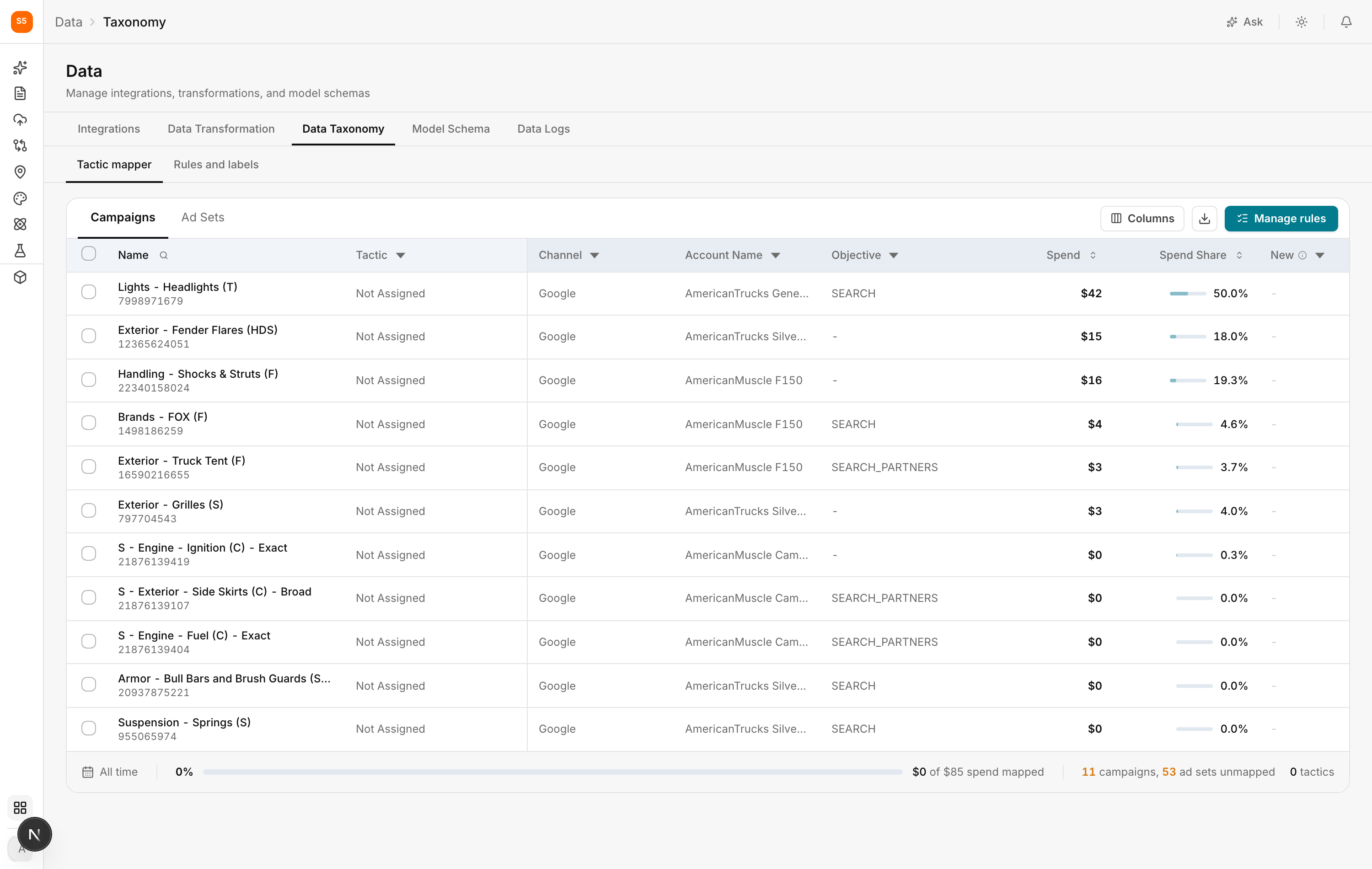
The Tactic mapper is where you assign campaigns to tactics, so this is where your measurement structure takes shape. Rules and labels sits alongside it and holds automatic assignment rules, so new campaigns land in the right tactic without you touching them again.
In the mapper, you can switch between Campaigns and Ad Sets. Most people work at campaign level, and that's the best place to start. Switch to ad set level when one campaign genuinely contains several tactics, which happens most often on Meta. Working a level deeper keeps those results clear.
Catch unclassified spend by understanding how campaigns and ad sets relate
This is worth understanding properly, because it's the source of the most commonly missed problem in Data Taxonomy.
Tactics are assigned at the ad set level. A campaign holds several ad sets, and they don't all have to share the same tactic. So what you see in the Campaigns view is a summary of its ad sets, not a setting of its own. If an ad set isn't mapped, the campaign view can look fine when it isn't.
This means a campaign can be in one of five states:
| State | What it means |
|---|---|
| Unmapped | None of its ad sets have a tactic. |
| Fully mapped | Every ad set is mapped, all to the same tactic. This is the most common case. |
| Fully mapped, split | Every ad set is mapped, but across two or more tactics. This is perfectly valid. |
| Partially mapped | Some ad sets are mapped and some aren't, all to one tactic. |
| Partially mapped, split | Some ad sets are mapped and some aren't, across several tactics. |
The two partial states are the ones to look out for. A campaign with four of its five ad sets mapped looks fine at a glance, but the spend in that fifth ad set never reaches your model. It isn't reported as an error anywhere, because nothing has gone wrong technically. It's simply unclassified.
Because the mapper shows these states separately, you can filter by them. Open the status filter on the Tactic column and look specifically for the partial states. Doing this once a month catches campaigns that have added a new ad set since you last checked.
The Tactic cell on a partially mapped campaign also shows a breakdown: how many ad sets are mapped, which tactics they're mapped to, and how much spend is still unmapped.
Find the campaigns that matter most in the tactic mapper table
Use Columns to show or hide what appears in the table, including custom dimensions you created in Data Transformation. The download icon exports the current view as a CSV, which is useful when you want to agree on tactics with a colleague in a spreadsheet first.
| Column | What it tells you |
|---|---|
| Name | The campaign name as the platform reports it, with its ID underneath. |
| Tactic | How this campaign has been classified. Starts as Not Assigned. |
| Channel | Which platform the spend came from. |
| Account Name | Which ad account it belongs to. |
| Objective | The platform's own objective, such as SEARCH. Often a helpful hint when you're unsure. |
| Spend | How much this campaign spent over the period. |
| Spend Share | That spend as a share of the total, so you can see what deserves your attention. |
| New | Flags campaigns that appeared recently and haven't been classified yet. |
Track your progress by spend, not campaign count
The progress bar along the bottom gives you a clear summary: how much spend is mapped, how many campaigns and ad sets are unmapped, and how many tactics exist.
Focus on the spend mapped percentage rather than the campaign count. Classifying 80 percent of campaigns means little if they're the ones spending nothing. Getting 95 percent of spend mapped is real progress.

Assign tactics by hand or let rules do it for you
Most teams use both approaches.
| Use case | Approach | Read more |
|---|---|---|
| Your first pass, exceptions, and the long tail of small campaigns | Select campaigns and assign them directly | Assign tactics by hand |
| Anything that repeats, including campaigns that don't exist yet | Write a rule that matches a naming pattern | Assign tactics automatically with rules |
Start by hand to learn which patterns exist, then write rules so your taxonomy maintains itself.
Get the most out of Data Taxonomy
Lean on your naming convention, and fix it if you can't. Rules work best when campaign names follow a pattern. If yours don't, Data Taxonomy will make that clear, and the long-term fix is a naming convention rather than more rules.
Keep your list of tactics small. Half a dozen tactics everyone understands beats thirty that nobody maintains. You can always split a tactic later when you have a real reason to.
Work with the person who runs the campaigns. They know which campaigns were experiments and which are dormant. That context isn't in the data.
Check back monthly. Sort by the New column and classify anything that has appeared.
Skip what doesn't matter. Campaigns with very little spend can stay unassigned without affecting your model.
Frequently asked questions
What is Data Taxonomy in Lifesight?
Data Taxonomy is where you group campaigns into tactics, the units you want to measure. Instead of measuring spend by platform or account, you measure it by what each campaign was meant to do, such as brand defense or prospecting.
What is a tactic?
A tactic groups campaigns by their purpose rather than where they ran. It usually combines a channel with an intent and often a funnel position, such as Paid Search Brand Upper or Paid Social Retargeting Lower.
Why can't I just measure performance by ad platform?
Campaigns in the same platform often do very different jobs. A brand search campaign may show a high return because people were going to buy anyway, while a prospecting campaign may look weaker but drive real growth. Measuring them together hides which one is actually working.
How many tactics should I create?
Keep the list small. Create a tactic only when you would realistically change its budget independently of everything else. Half a dozen well-understood tactics works better than dozens nobody maintains.
Should I assign tactics at campaign level or ad set level?
Start at campaign level. Switch to ad set level when one campaign contains several tactics, which is most common on Meta.
Why does a campaign show as partially mapped?
Tactics are assigned at the ad set level. A campaign is partially mapped when some of its ad sets have a tactic and others don't. The spend in the unmapped ad sets won't reach your model.
How do I find partially mapped campaigns?
Open the status filter on the Tactic column and filter for Partially mapped or Partially mapped, split. Checking this monthly catches campaigns that have added new ad sets.
Is it a problem if a campaign is split across tactics?
No. A campaign that's Fully mapped, split has every ad set mapped, just to different tactics. This is perfectly valid.
Can a campaign belong to two tactics?
A single campaign can't be assigned two tactics directly. If a campaign is genuinely doing two jobs, split it at ad set level by assigning its ad sets to different tactics.
How do I know how much of my spend is classified?
Check the spend mapped percentage in the progress bar at the bottom of the mapper. Focus on spend rather than campaign count, since unmapped high-spend campaigns matter far more than low-spend ones.
Can I export my campaigns to plan tactics in a spreadsheet?
Yes. Click the download icon to export the current view as a CSV.
Should I assign tactics manually or with rules?
Most teams use both. Assign tactics by hand for your first pass, exceptions, and small campaigns. Write rules for anything that follows a repeating naming pattern, so new campaigns are classified automatically.
How do I classify new campaigns?
Sort by the New column in the Tactic mapper and assign tactics to anything that has appeared. Rules can also classify new campaigns automatically if their names match a pattern.
What happens to campaigns I never classify?
They stay unassigned. Their spend is still recorded, but it can't be measured as part of a tactic.
Do I need to classify every campaign?
No. Campaigns with very little spend can stay unassigned without affecting your model.
If I rename a campaign, do I lose its tactic?
No. Tactic assignments follow the campaign ID, not its name.
Does Data Taxonomy change my campaigns in the ad platform?
No. Nothing in Data Taxonomy writes back to the ad platform.
Where are tactics used in Lifesight?
Tactics are mainly used in Model Schema, where paid media variables are defined by channel and tactic, and in reporting, where you want performance grouped the way you run your marketing.
What is the difference between Data Taxonomy and Data Transformation?
Data Transformation defines what each column in your data means. Data Taxonomy groups campaigns into tactics so you can measure them by purpose.
Related Articles
Updated about 1 hour ago