
Assign tactics manually to cover your biggest spend first
Classify campaigns into tactics one selection at a time, which is the fastest way to cover most of your spend on day one.
Assigning tactics by hand lets you get the campaigns that carry your budget classified quickly, so they can be measured accurately. Most teams start here. It's the right choice for your first pass and for the long tail of campaigns (the many small or unusual campaigns) that no rule will ever catch cleanly.
The goal isn't to classify every campaign. It's to classify the campaigns that carry the money.
Know when manual assignment works best
- Your first pass, before you know which patterns your campaign names follow
- Small accounts, where a handful of campaigns cover everything
- One-off campaigns that will never repeat, so a rule isn't worth writing
- Campaigns whose names are misleading, where what the name says and what the campaign does are two different things
For anything that repeats, and for campaigns that don't exist yet, use Assign tactics automatically with rules instead.
Classify your highest-spend campaigns first
- Go to Data > Data Taxonomy.
- Stay on Tactic mapper, in the Campaigns view.
- Sort by Spend, highest first. This is the most useful step, because it puts your biggest budgets at the top.
- Select the campaigns that belong to the same tactic. You can select several at once.
- Assign the tactic to the whole selection.
- Save your changes.
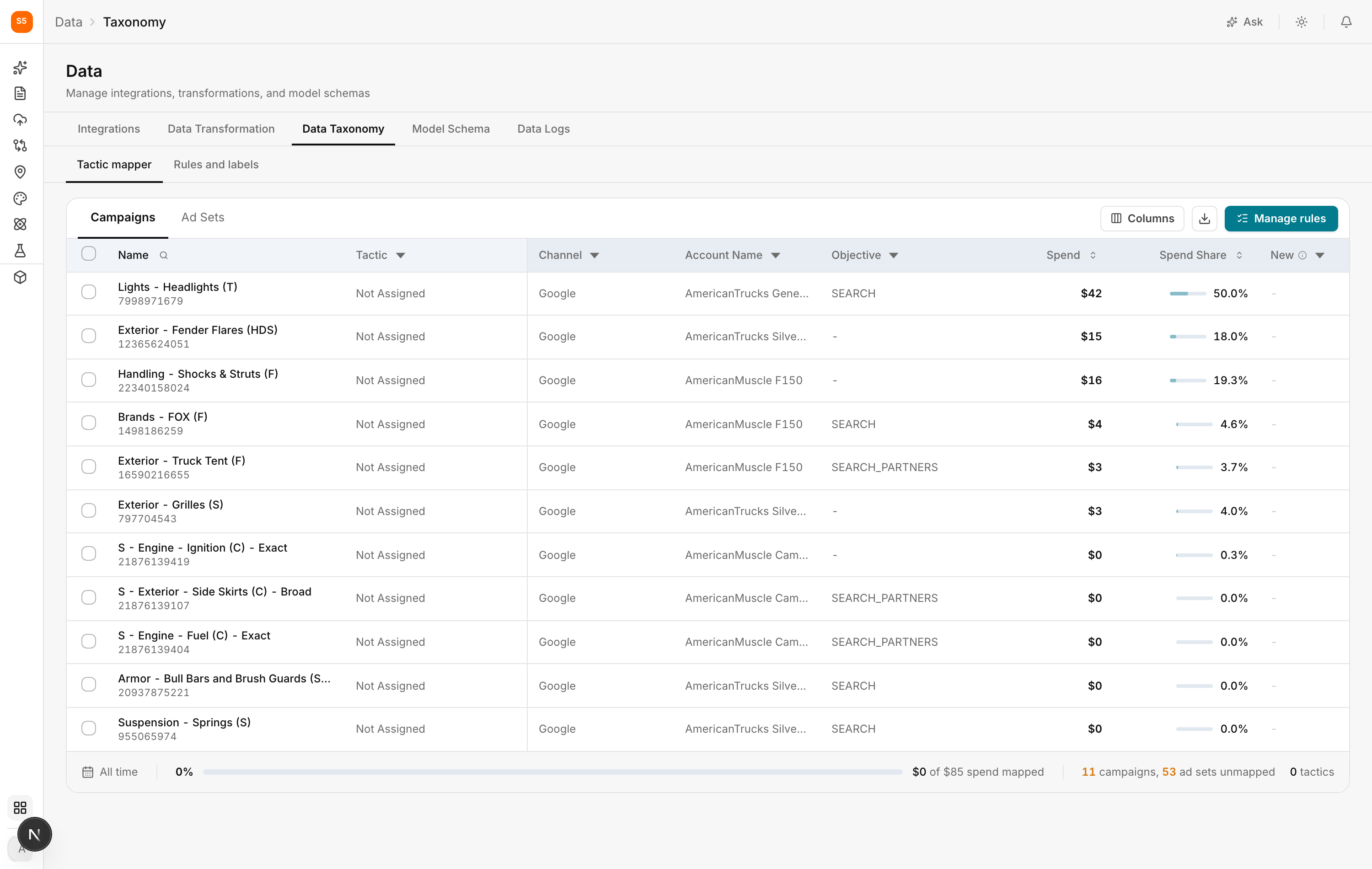
Repeat down the list. Track the spend mapped percentage at the bottom rather than the campaign count. Classifying 80 percent of campaigns means very little if they're the ones spending nothing, while 95 percent of spend mapped is real progress.
Split campaigns that do more than one job at ad set level
Switch to Ad Sets when one campaign genuinely contains more than one tactic. This is most common on Meta, where prospecting and retargeting audiences (people new to your brand versus people who've already engaged) often share a campaign.
Tactics are actually attached at the ad set level. A campaign holds several ad sets, and what you see in the Campaigns view is a summary of what its ad sets say. Assigning a tactic to a campaign assigns it to all of its ad sets.
Find partially mapped campaigns before they cost you
Because ad sets are mapped individually, a campaign can end up only partly classified. For example, four of its five ad sets have a tactic and the fifth doesn't, usually because it was created after you last checked.
This is the gap that costs you real money, and it's easy to miss. Nothing shows an error, and the campaign doesn't look unmapped. The spend in that fifth ad set simply never reaches your model.
The mapper shows each state separately so you can spot them:
- Fully mapped and Fully mapped, split are both fine. Split just means the ad sets are correctly assigned to different tactics.
- Partially mapped and Partially mapped, split are the ones to fix.
Use the status filter on the Tactic column to show the partial states, then open the Tactic cell on any campaign that appears. The breakdown shows how many ad sets are mapped, which tactics they're mapped to, and how much spend is still unclassified.
Checking this once a month catches campaigns that have added a new ad set.
Only split at ad set level when you need to. A campaign genuinely doing two jobs deserves the split. Splitting one that doesn't just adds maintenance with no benefit.
Choose tactics that match your budget decisions
There's no single correct list. A good rule of thumb: create a tactic when you would realistically change its budget independently of everything else.
If you never move money between brand and non-brand search, splitting them gains you nothing. If you debate it every quarter, split them.
Start small. Half a dozen tactics everyone understands beats thirty nobody maintains, and you can always split a tactic later.
See how tactics power the rest of Lifesight
Tactics aren't just a reporting label. They're the unit several parts of Lifesight use to measure and plan your marketing.
Model Schema defines paid media variables by channel and tactic. A tactic that doesn't exist in Data Taxonomy can't be selected there, so unclassified spend can't enter a model as its own variable.
Marketing Mix Modeling estimates a separate contribution and saturation curve (the point where more spend stops delivering meaningful additional results) for each tactic you define. This is where your work pays off. If brand and non-brand search are one tactic, the model returns one blended return that describes neither, and brand campaigns will make prospecting look better than it is. Split them, and you get two accurate answers.
Channel Deep Dive and Campaigns reporting groups performance the way you classified it, which is why your tactics should match how your team actually talks about its marketing.
Planner builds media plans using these tactics, so your scenarios are only as actionable as your tactics are realistic.
Optimizer applies budget changes to them. A recommendation to shift budget into a tactic is only useful if that tactic is something you can actually scale.
Attribution uses the same grouping, so classifying once keeps your modeled and attributed views aligned.
Frequently Asked Questions
When should I assign tactics manually instead of using rules?
Assign tactics manually for your first pass, small accounts, one-off campaigns, and campaigns whose names don't reflect what they do. Use rules for anything that repeats or for campaigns that don't exist yet.
Do I need to classify every campaign?
No. Focus on the campaigns that carry your budget. Campaigns with very little spend can stay unassigned without affecting your model.
How do I assign tactics manually in Lifesight?
Go to Data > Data Taxonomy, stay on Tactic mapper in the Campaigns view, and sort by Spend, highest first. Select the campaigns that belong to the same tactic, assign the tactic, and save your changes.
Can I assign a tactic to several campaigns at once?
Yes. Select multiple campaigns and assign the tactic to the whole selection.
Why should I sort by spend first?
Sorting by spend puts your biggest budgets at the top, so you classify the campaigns that matter most to your measurement first.
How do I measure my progress?
Track the spend mapped percentage at the bottom of the mapper rather than the campaign count. A high share of mapped spend means most of your budget can be measured by tactic.
When should I work at ad set level?
Switch to Ad Sets when a campaign genuinely contains more than one tactic, such as a Meta campaign that mixes prospecting and retargeting audiences.
What happens when I assign a tactic to a campaign?
The tactic is applied to all of the campaign's ad sets, since tactics are attached at the ad set level.
What does partially mapped mean?
A partially mapped campaign has some ad sets with a tactic and some without. The spend in the unmapped ad sets doesn't reach your model, and no error is shown.
How do I find partially mapped campaigns?
Use the status filter on the Tactic column to show Partially mapped and Partially mapped, split campaigns. Open the Tactic cell to see how many ad sets are mapped and how much spend is still unclassified.
Is a split campaign a problem?
No. Fully mapped, split means every ad set is mapped, just to different tactics. Only partial states need fixing.
Should I split every campaign at ad set level?
No. Only split campaigns that genuinely do more than one job. Splitting campaigns unnecessarily adds maintenance with no benefit.
How do I decide which tactics to create?
Create a tactic when you would realistically change its budget independently of everything else. Start with a small set everyone understands, and split tactics later if you need to.
Why do tactics matter for Marketing Mix Modeling?
Marketing Mix Modeling estimates a separate contribution and saturation curve for each tactic. Combining different tactics, such as brand and non-brand search, gives you one blended result that describes neither accurately.
Where else are tactics used in Lifesight?
Tactics are used in Model Schema, Marketing Mix Modeling, Channel Deep Dive and Campaigns reporting, Planner, Optimizer, and Attribution.
What happens to campaigns I never classify?
They stay unassigned. Their spend is still recorded, but it can't be measured as a tactic, so a model can't separate its effect.
Can a campaign belong to two tactics?
A campaign can't be assigned two tactics directly. If it's genuinely doing two jobs, split it at ad set level.
If I rename a campaign, do I lose its tactic?
No. Tactic assignments follow the campaign ID, not its name.
Does assigning tactics change my campaigns in the ad platform?
No. Nothing in Data Taxonomy writes back to the ad platform.
How often should I review my tactic assignments?
Monthly is enough. Sort by the New column, classify anything that has appeared, and check for partially mapped campaigns.
Related Articles
Updated about 1 hour ago