
Set a fixed value for a source
Stamp the same value on every row from a source, so data that is missing a column still lines up with everything else.
Some of the most useful information about a source never shows up in its data. A UK store sales file has no country column because every row is already the United Kingdom. A partner's monthly report has no channel column because the partner only sells one channel. The context lives in the file name, or in someone's head, and your models never see it.
A fixed value closes that gap. You type the value once, and every row arriving from that source carries it. The file stays as it is, and the data lands in your models already labeled by country, channel, brand, or currency, so it can be compared and modeled alongside everything else.
When to use it
The test is simple. If the answer would be identical on every single row of this source, use a fixed value. If it varies row to row, it has to come from a column, even a messy one.
Common cases:
- Country or region on an offline sales file that covers one market.
- Channel on a file from a partner or a small platform with no connector.
- Brand on a file covering a single brand, when your models split by brand.
- Currency on a file that reports in one currency throughout.
How to do it
- Go to Data > Data Transformation.
- Find the source and click View Fields.
- Open the field you want to set, or create the field if it does not exist yet.
- Under How this field gets its value, choose A fixed value for every row.
- Type the value on the left under Fixed value.
- On the right, pick the Lifesight field it fills.
- Click Save changes.
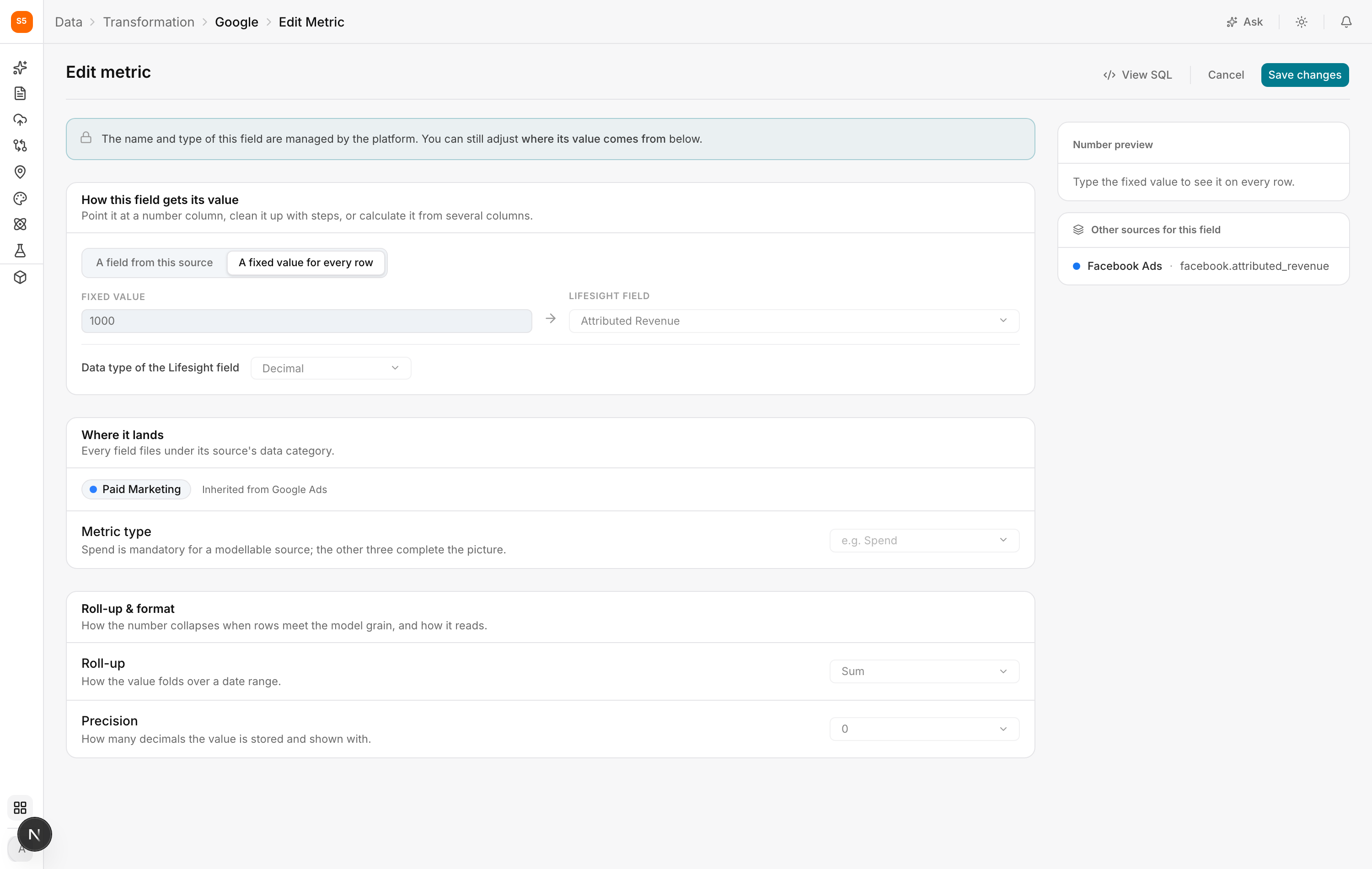
Nothing is read from a column in this mode, so there is no source column to pick and no preview of varying values. What you type is what every row gets.
A worked example
A retailer uploads a CSV of in-store sales. It has date, store and sales, and nothing else. Every store is in the United Kingdom, so nobody thought to add a country column.
Online orders, which come from Shopify, do have a country. If the in-store file is left as it is, the two sources cannot sit in the same model without the in-store rows having a hole where country should be.
So they map sales to Revenue as a field from the source, and they add Country as a fixed value of United Kingdom. Now both sources describe themselves the same way, and a model can look at total revenue across online and offline together, or split it by country, without either source dropping out.
Where this shows up in the rest of Lifesight
Fixed values are quiet, and they are usually the difference between a source being usable and being stranded.
Model Schema can only split a model by a dimension when every contributing source carries that dimension. Turning on the dimensional option to model per country will exclude or misgroup any source with no country value. A fixed value is what lets an offline or partner file join that split properly.
Marketing Mix Modeling needs every pound of spend and every pound of revenue accounted for. A source that cannot be grouped consistently either gets left out, which understates the baseline, or lands in a catch-all bucket, which muddies the channel it should have belonged to. Either way the contributions it reports for your real channels shift.
Data Taxonomy classifies campaigns by channel among other things. A file with no channel column has nothing to classify on until a fixed value gives it one.
Attribution and Analyze dashboards group by these dimensions. A missing value is what produces the "unknown" or "not set" rows people ask about.
Geo Experiments depend on a geographic dimension being present and consistent. Sources that cannot report geography per row, but which are known to cover one market, are made usable by a fixed value.
Frequently asked Questions
Can I change the value later?
Yes. Edit the field and save. It applies to the history already held as well as to new data.
What if my file covers two countries?
Then a fixed value is the wrong tool. Either add a country column to the file, or split it into one file per country and set a fixed value on each.
Can I use a fixed value on a native connector rather than a file?
Yes, though it is rarer. Connectors usually report their own dimensions. It is occasionally useful for tagging an entire account as belonging to a particular brand or business unit.
Does a fixed value count as data the model can learn from?
No, and that is the point. A value identical on every row carries no information on its own. Its job is to let this source be grouped and compared alongside the others.
Related Articles
Updated about 1 hour ago