
Map a source to a channel
Tell Lifesight which channel a source's data belongs to, so its spend is grouped with the right marketing activity.
Before individual columns mean anything, the source has to say what it is. A file named Q4_partner_export.csv tells a model nothing. Knowing that the spend inside it is Paid Social tells it a great deal.
Mapping a source to a channel is how you say that. It happens once per source, and it decides how every row underneath gets grouped.
When you need to do it
Native connectors do not need this. Google Ads already knows it carries Google and YouTube. Meta already knows it carries Facebook and Instagram. Connector data arrives with its channel attached.
Uploaded files and spreadsheets almost always do need it. A CSV has whatever columns someone put in it, and nothing in the file says what channel the numbers belong to.
How to do it
- Go to Data > Data Transformation and open the source with View Fields.
- In the left rail, find Channel and open it.
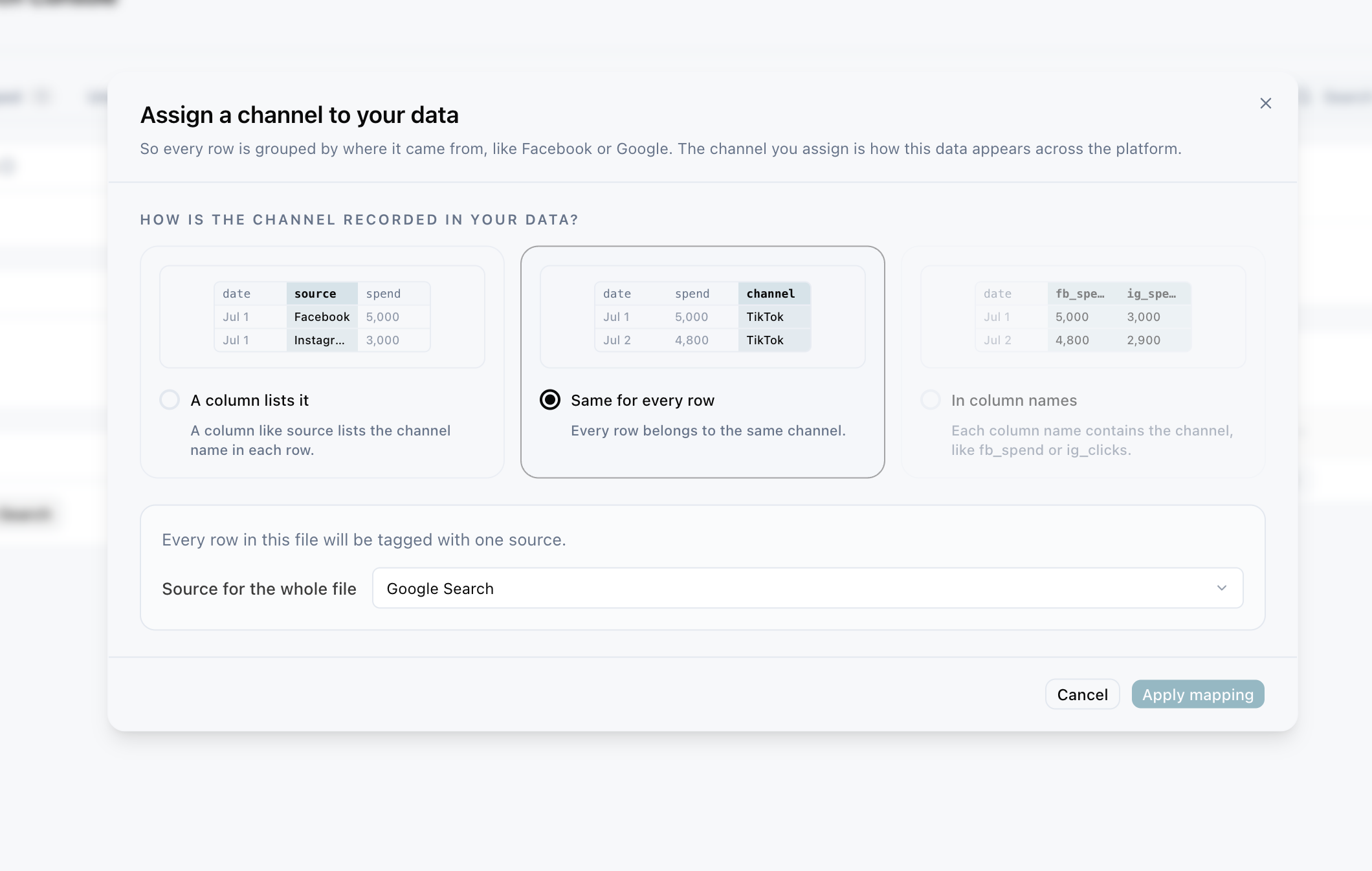
- Choose the shape that matches your data.
- Assign the channels and save.
The left rail is a summary of the row contract, which is the shape of one row of this source. Alongside Channel it shows the Data category the source files under and the Date column with its granularity, both set when the integration was created.
The three shapes
Picking the right shape is the whole task. Look at your file and ask where the channel information actually lives.
One channel per column
The columns themselves are the channels.
DATE        WEEK   EMAIL_SPEND   OBA_SPEND   INKPACT_SPEND
2026-01-05  W1     1240          890         310
There is no channel column, because the channel is encoded in the column names. You assign a channel to each spend column.
This shape is common in planning spreadsheets, where a human reader is meant to scan across a row.
A column holds the channel
One column names the channel, and each row carries a value.
date        channel   spend   impressions
2026-01-05  fb        100     5000
2026-01-05  google    200     8000
You pick the column that holds the channel, then map each distinct value in it to a channel Lifesight recognises.
Lifesight proposes matches for common abbreviations, so fb and meta suggest Facebook Ads, bing suggests Microsoft Ads, and tt suggests TikTok Ads. Read the suggestions rather than accepting them wholesale. In-house shorthand is rarely as obvious as it seemed to whoever invented it, and a mis-mapped abbreviation quietly files a channel's spend under the wrong name.
The whole file is one channel
No channel column, because every row is the same thing. A monthly report from a single partner, or a file covering one sponsorship.
You confirm the single channel for the source and you are done.
A worked example
A retailer receives a monthly spreadsheet from a partnerships agency. It has date, partner, cost and clicks, where partner holds values like inkpact, oba and email.
That is the second shape. They pick partner as the channel column, then map each value: email to Email, and the two partner names to the channels they set up for them.
From then on, every row of that file is attributed to the right channel automatically, including next month's file with the same structure.
Where this shows up in the rest of Lifesight
Channel is one of the primary grouping keys in the platform, so getting it wrong at the source level propagates everywhere.
Model Schema offers paid media variables by channel, and narrows to tactics within that channel. A source with no channel cannot be selected as a paid media variable at all, so its spend simply cannot enter a model.
Marketing Mix Modeling estimates contribution per channel and tactic. Spend filed under the wrong channel does not vanish, which would at least be obvious. It inflates a channel that did not earn it and starves the one that did, and the resulting recommendation is confidently wrong.
Data Taxonomy shows Channel as a column and lets you write rules against it. A source without a channel has one less thing to classify on.
Attribution and Analyse dashboards group spend and performance by channel, so this is what stops an uploaded file appearing as an unlabelled row.
Frequently asked questions
My file has two channels mixed together in one column.
That is the second shape, and it is exactly what it is for. Map each value separately.
My file has channels in the columns and a channel column.
Pick whichever is complete and correct, then ignore the other. Mixing the two shapes in one file usually means it was assembled by hand, and it is worth restructuring at source.
Can I change the channel later?
Yes. Reopen the Channel entry in the left rail and change it. It applies to the history already held.
What if the channel does not exist in Lifesight yet?
You can name it during mapping. Keep the naming consistent with what you use elsewhere, since this is what a model will group on.
Updated about 1 hour ago