
StackAdapt
Connect your StackAdapt programmatic account with an API key to see what native, display, video, CTV and audio each return, and fund them accordingly.
StackAdapt is a programmatic advertising platform that lets you plan and run campaigns across native, display, video, connected TV, audio, in-game and digital out of home, alongside email. Because it spans so many formats, its spend is easy to under measure: much of it is upper funnel activity that never produces a click you can follow.
Connecting StackAdapt automates the ingestion of that programmatic data so you stop exporting reports by hand, and so those formats get modelled rather than ignored.
What Lifesight brings in
Lifesight reads every level of the StackAdapt structure:
- Advertiser the top level account campaigns are organised under
- Campaign Group a grouping of related campaigns
- Campaign where objective, budget and flight dates are defined
- Ad / Creative the individual units served, across native, display, video, CTV, audio and more
The data pulled includes:
| Category | Data points |
|---|---|
| Performance metrics | Spend (media cost), Impressions, Unique Impressions, Clicks, Click Through Rate, Video Views and Completions |
| Conversion metrics | Conversions, Conversion Rate, Return on Ad Spend |
| Cost metrics | Cost Per Click, Cost Per Mille, Cost Per Engagement |
| Hierarchy dimensions | Advertiser, Campaign Group, Campaign Name, Ad or Creative Name |
| Targeting dimensions | Geo, Device, Channel, Audience Segment |
Before you start
You need two things.
- An active StackAdapt account with API access enabled.
- A StackAdapt API Key, which you generate inside StackAdapt rather than in Lifesight.
Getting your API key
- Sign in to StackAdapt at https://www.stackadapt.com/login.
- Open Account Settings from the account menu in the top right.
- Go to the API Integration section.
- Copy your API Key.
If the API Integration section is not visible, or no key is listed, API access has not been provisioned on your account yet. Contact StackAdapt Support or your StackAdapt account manager to enable it. Lifesight uses StackAdapt's read only Reporting API, so a reporting or REST API key is sufficient.
Connecting StackAdapt
- Go to Data > Integrations and click Add Integration.
- Search for StackAdapt and click Connect on the tile.
- On the Authenticate step, paste your key into the API Key field. Your credentials are encrypted and stored securely.
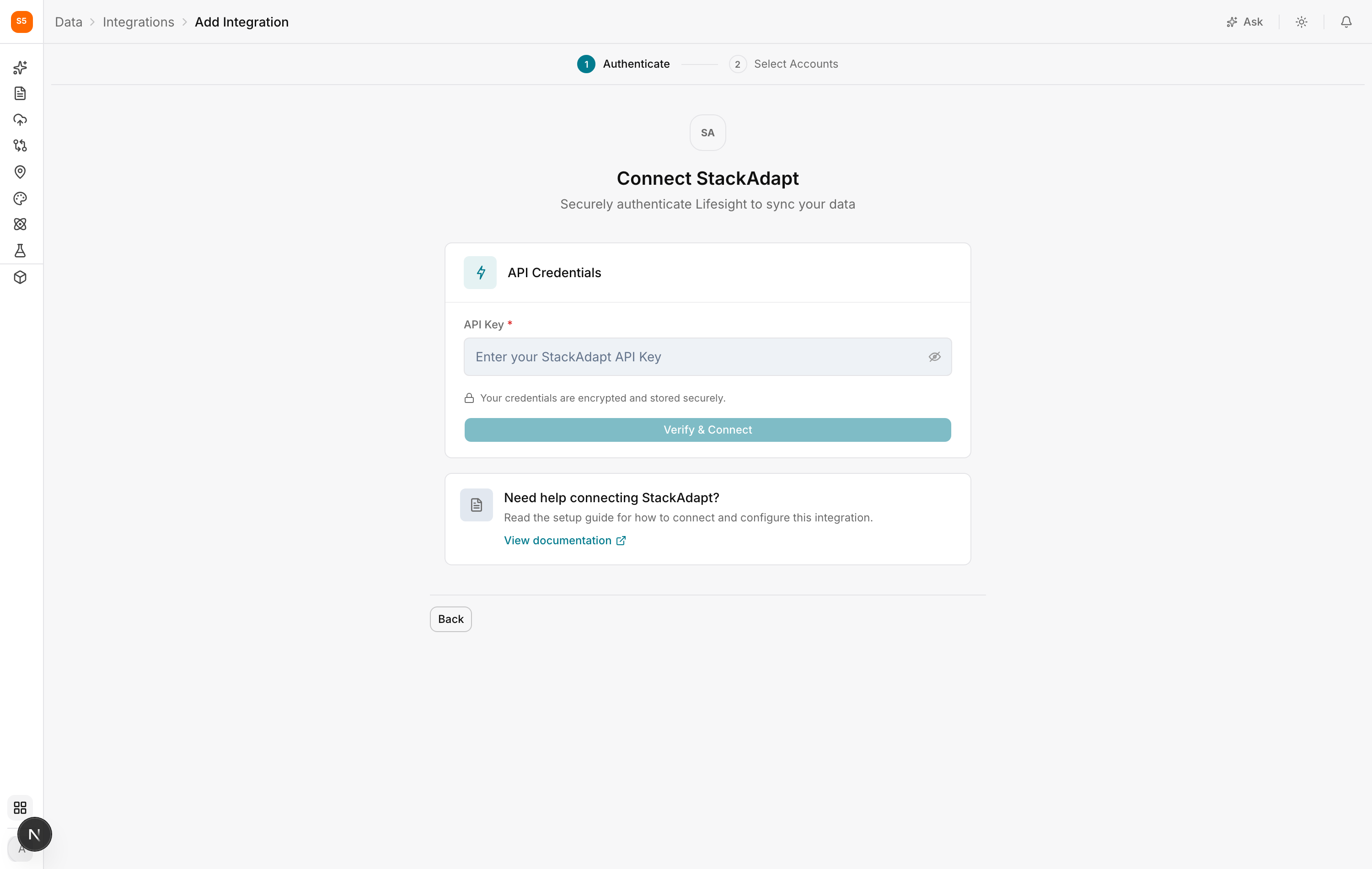
- Click Verify and Connect. Lifesight validates the key and retrieves the accounts it can reach.
- On the Select Accounts step, choose the StackAdapt accounts you want to sync.
- Click Connect to finish.
Lifesight begins its initial pull. This can take a while depending on how much history you have. Once the first sync completes, the integration shows as Healthy and refreshes automatically on a schedule.
After connecting
Check the field mappings in Data > Data Transformation. Programmatic sources often report spend as media cost, so confirm that the field mapped to Spend is the one your finance team would recognise as what you actually paid.
Then classify the campaigns in Data > Data Taxonomy. StackAdapt is worth splitting by format rather than treating as one channel, because CTV and native display do very different jobs and deserve to be measured separately.
Troubleshooting
API key rejected. Confirm the key was copied in full with no leading or trailing spaces, and that API access is enabled on your StackAdapt account.
No accounts listed after verifying. The key does not have permission to reach any advertiser account in StackAdapt. Ask your account manager to check its scope.
I need to add more accounts later. Reopen the StackAdapt integration from the Integrations page and adjust the selected accounts. You do not need a new key.
Spend does not match the StackAdapt dashboard. Check whether the dashboard is showing media cost or total cost including fees, and make sure the date ranges and timezone match.
Updated about 1 hour ago