
MMM Budget Optimizer
Learn how to allocate optimized budgets with Budget Optimizer powered by MMM
Once the model is ready, you can access the Budget Optimizer to optimize your future ad spends. Based on the historical data, the model predicts what should be the optimum distribution of the budget that will bring maximum results.
The model automatically optimizes your budgets for the period of next week. In the report, you can view the optimized budget plan and the estimated performance of your marketing activities as suggested by the marketing mix model.
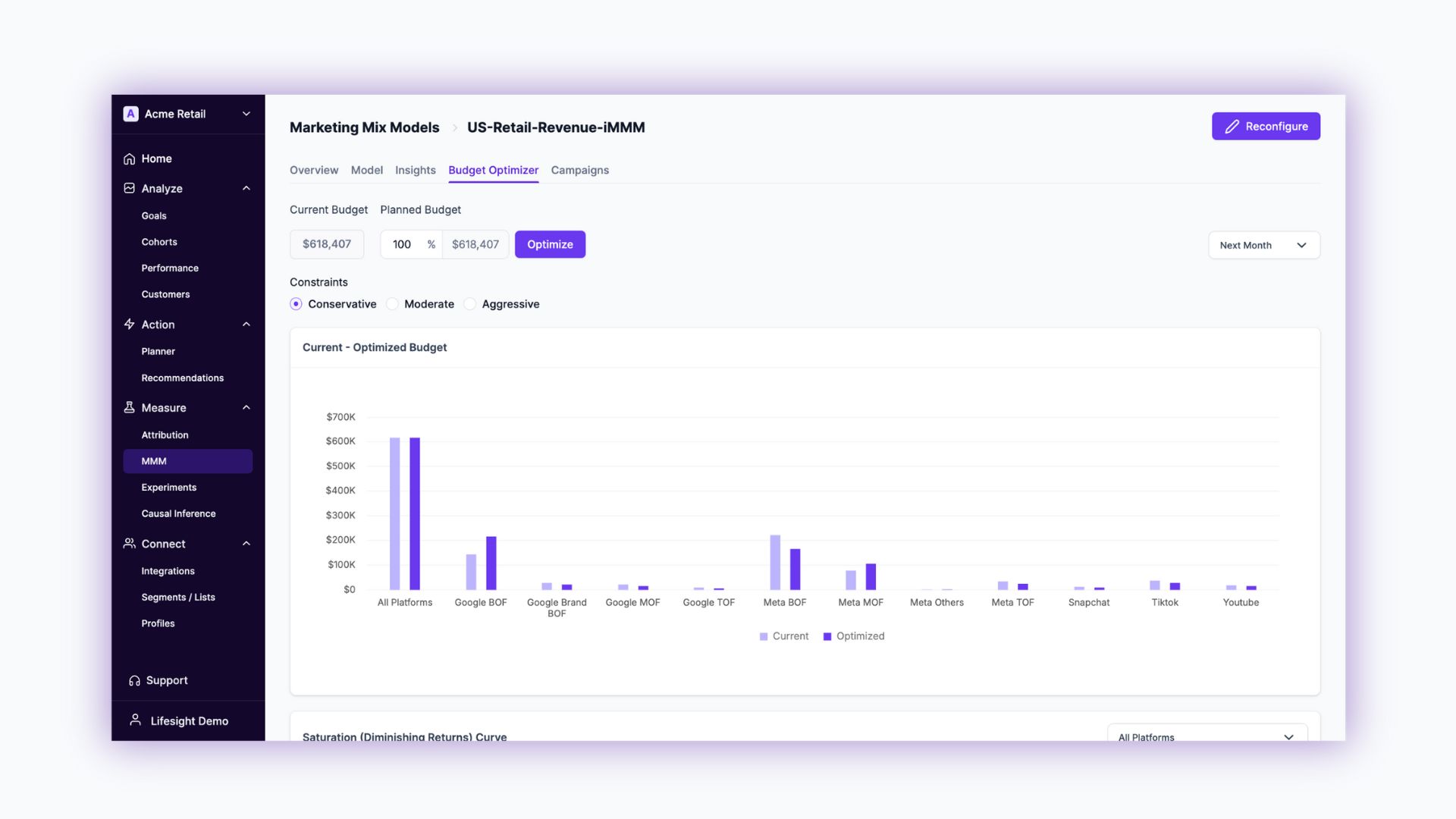
Budget Planning
Optimize channel budget allocation for next month or next quarter. iew channel-wise budget allocation based on the MMM model analysis.

Current Budget & Planned Budget
- Current budget - The budget is calculated by analyzing the past spends in the previous month if 'Next Month' is selected, or previous Quarter if 'Next Quarter' is selected.
- Planned budget - Change the percentage of the budget between 50-500% to view where and how much to allocate in each channel for the selected optimization period.
Constraints
Constraints help instruct the MMM model on how much it can vary the budget across channels. Aggresive gives maximum control to the model to achieve the most effective media allocation but may not be realistic in a real-world use case for some brands.
- Conservative: The existing budget constraints are adjusted to 0.75 times for the lower limit and 1.5 times for the upper limit.
- Moderate: Budget constraints are modified to 0.5 times for the lower limit and doubled for the upper limit.
- Aggressive: The budget limits are significantly altered to 0.01 times for the lower threshold and 4.99 times for the upper threshold.
Current - Optimized Budget
View how the Budget Optimizer modifies current media spends vs optimized media spends across your media mix.
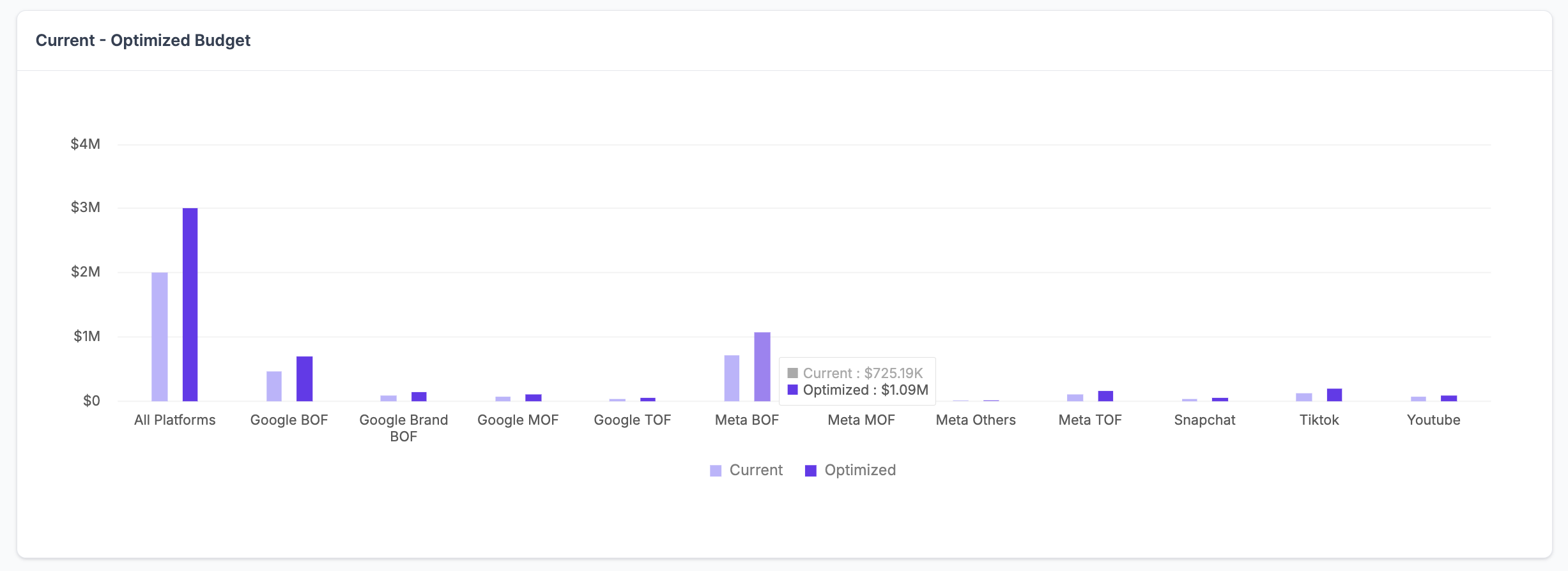
How to use the Budget Optimizer
- Select the period you would like to optimize the budget for. The budget period can be set as “Next week” or “Next month”.
- The platform will distribute the budget across channels as per the best model and you would be able to see current vs optimized ad spend distribution.
- You also have the option to input Target ROAS (if KPI data type is Revenue) or Target CPA (if KPI data type is anything except Revenue).
- You can set budget constraints for different platforms to keep your budget within specified limits. You can opt from preset modes—Conservative, Moderate, or Aggressive—to manage your spending.
View the optimized budget plan for the following time period -
- Next Month: The coming month from the first day through the last day of that month
- Next Quater: The coming Quater from the first day through the last day of that Quater
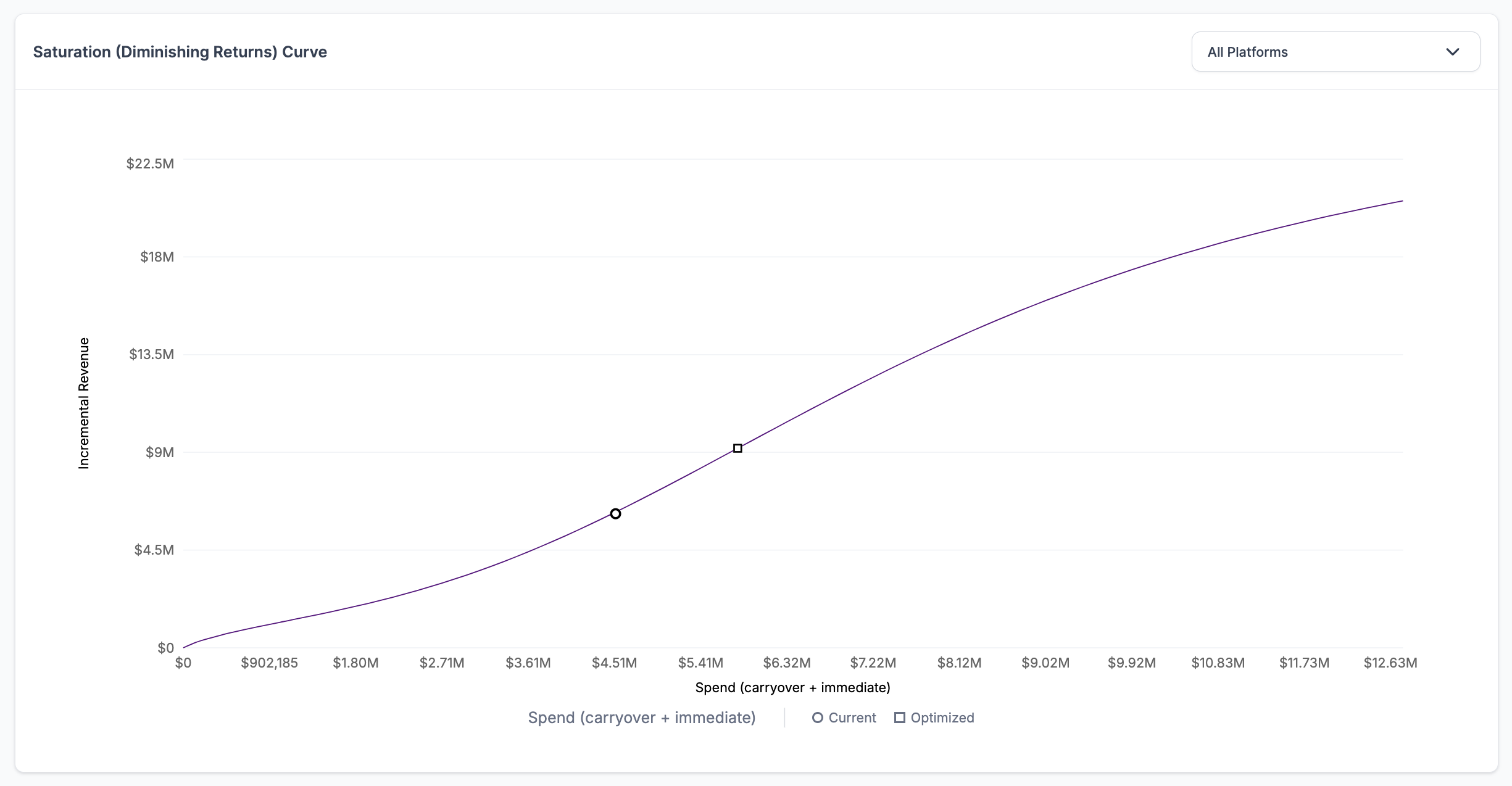
Saturation (Diminishing Returns) Curve
The Saturation (Diminishing Returns) Curve shows when increasing spending on a marketing channel leads to smaller returns. Initially, more investment boosts results, but over time, each additional dollar has less impact. This helps marketers optimize spending by identifying when further investment is no longer efficient, ensuring better resource allocation and avoiding overinvestment.
Select the Filter dropdown to view channel specific saturation curves or view overall All Platforms saturation curve.
Recommendations
The Recommendations table shows the budget allocation for various platforms. It compares the current budget with the recommended budget, alongside the corresponding current incremental revenue and predicted incremental revenue (or selected KPI). Additionally, it outlines the current ROAS and the predicted ROAS for each platform.
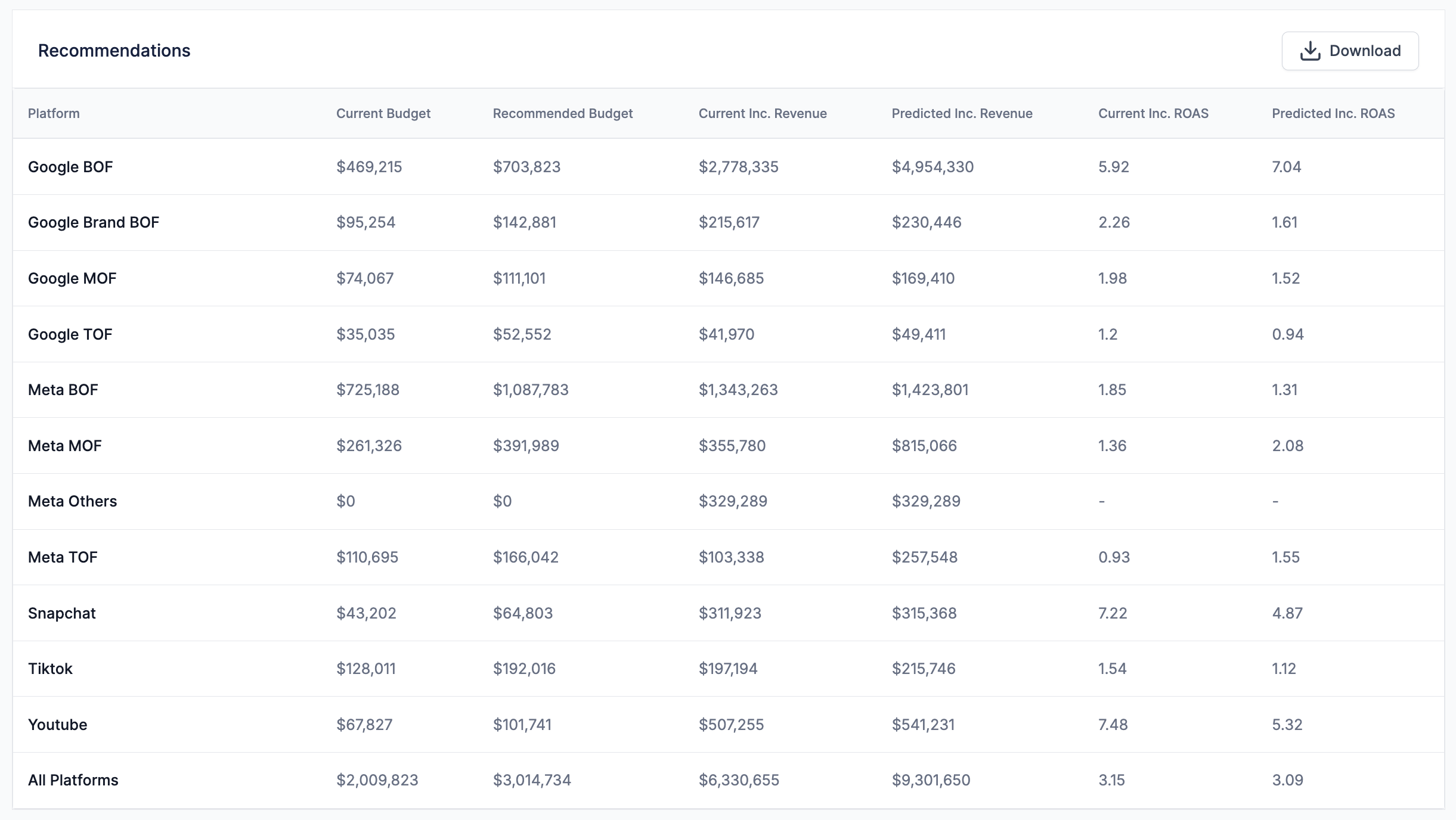
These recommendations are designed to optimize advertising spend and maximize returns. By increasing or adjusting budgets based on the predictions, you can achieve improved performance outcomes.
For example, increasing the budget for Google BOF is expected to increase the predicted ROAS from 5.92 to 7.04, reflecting higher potential revenue with the recommended adjustments.
The budget recommendation workshet can be downloaded in CSV format by clicking Download. The sheet can be shared with your channel managers to implement.
Learn more about reading budget optimizer insights
How the Optimizer Works
The Budget Optimizer operates in three primary stages:
1. Total Budget Optimization
- Data Collection: The Optimizer gathers historical performance data from your advertising campaigns, including metrics such as clicks, impressions, conversions, and cost per acquisition (CPA).
- Algorithm Application: A proprietary algorithm analyzes this data to determine the optimal total budget that is likely to yield the highest ROAS based on your campaign objectives and constraints.
- Sensitivity Analysis: The Optimizer can perform sensitivity analyses to assess how changes in your budget might impact overall performance.
2. Budget Allocation per Media Channel
- Media Performance Evaluation: The Optimizer evaluates the historical performance of each media channel, considering factors such as click-through rates (CTRs), conversion rates, and cost per click (CPC).
- Saturation Curve Analysis: It analyzes saturation curves for each media channel to identify potential diminishing returns at higher budget levels.
- Budget Distribution: Based on this analysis, the Optimizer recommends a budget allocation for each media channel that is expected to maximize ROAS, while considering factors like channel complementarity and competitive dynamics.
3. Real-time Adjustments
- Campaign Monitoring: The Optimizer continuously monitors your campaigns' performance in real-time.
- Budget Adjustments: If the Optimizer detects that a particular media channel is underperforming or nearing saturation, it can recommend adjustments to the budget allocation.
Key Benefits of Using the Budget Optimizer
- Improved ROAS: Optimize your budget allocation to significantly increase your Return on Ad Spend.
- Data-Driven Decisions: Leverage actionable insights based on historical data and predictive analytics.
- Increased Efficiency: Automate the budget allocation process, saving time and effort.
- Reduced Risk: Avoid wasting your advertising budget on ineffective channels by identifying potential diminishing returns.
- Enhanced Flexibility: Customize the Optimizer to meet the specific needs of your business and campaigns.
Our Budget Optimizer is a valuable tool for businesses seeking to optimize their advertising spending and achieve maximum ROI. By leveraging advanced algorithms and data-driven insights, the Optimizer empowers you to make informed decisions and drive your business growth.
Updated about 1 year ago